
AG Studio is an embedded analytics component built on AG Grid and AG Charts. It lets your users build their own reports and dashboards inside your application, whilst you retain control over permissions, authentication, persistence and theming.
We've just shipped AG Studio 3.0, focused on user self-service, AI integration, and performance at scale. This release adds:
- Studio Agent Framework: Connect your own LLM to AG Studio, allowing your users to analyse their data and build dashboards with natural language, whilst your application retains control over the runtime, agents, tools, and UI.
- Calculations UI: Define custom fields from the UI, not just at the code level, so users can expand their dataset without involving engineering.
- Undo & Redo: Step back and forth through state changes such as adding and removing widgets, adjusting the layout and applying filters.
- Server-side Pagination: Split large queries into paged
getData()calls, so Studio only fetches the rows a user's action needs.
Studio Agent Framework
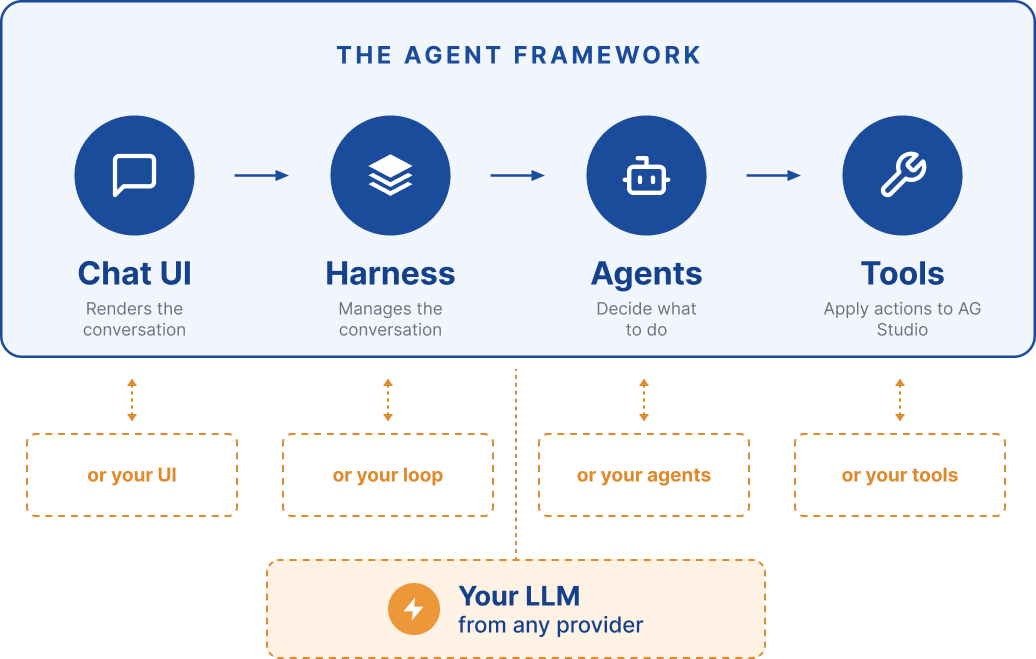
The Studio Agent Framework allows you integrate your own LLM into AG Studio, giving users the ability create dashboards with natural language, while your application retains control of the model, agents, tools, and UI:
How it works
The Framework consists of four things:
- Harness: Manages the conversation with the user, orchestrates the agents within AG Studio, and exposes what your UI needs to render.
- Agents: Decide what actions to take in response to a user's input.
- Tools: Enable agents to interact with AG Studio.
- ChatUI: Reads a session's messages, status and artefacts from the harness and renders them.
In version 3 of AG Studio, each of the features within the Framework can now be customised:
- Create your own Harness using tools like the AI SDK or TanStack AI.
- Modify our Agents instructions, or replace them with your own entirely.
- Extract our Tools into your own loop or define new, custom tools.
- Replace the ChatUI with your own UI.
Getting started
Unless you have existing AI infrastructure, the fastest way to get started is with the default harness. All you need to do is write an adapter that translates requests between Studio and your LLM, pass it to createAiHarness, and Studio takes care of the rest. Our example includes an adapter for OpenAI which you can use as a starting point for other vendors:
// You should proxy calls via backend so your API key is not exposed on the client
const adapter = openaiAdapter({
    endpoint: 'https://api.openai.com/v1/responses',
    key: MY_KEY,
});

const ai = ({ api }) => createAiHarness(api, { adapter });

<AgStudio ai={ai} />Calculations UI
With the new Calculations UI, users can define new fields themselves from within Studio, without asking a developer to change the config. Open the menu on a data source in the Data Panel and choose one of two kinds of field:
- Calculated Columns: return a value for each row, for example
Sales[Revenue] - Sales[Cost]. - Measures: return a single, aggregated value for the rows they cover, for example
SUM(Sales[Revenue]).
The new field opens in the Edit Panel, where the user gives it a name, writes its expression and chooses a format. The expression input autocompletes functions and fields, matches brackets and highlights syntax errors as you type:
Fields created this way are saved in the report state, so they can be persisted and restored.
Undo & Redo
AG Studio 3.0 now supports Undo & Redo actions, allowing users to move back and forth through state changes, including adding and removing widgets, adjusting the layout, applying filters and modifying the schema:
This feature is enabled by default and controlled via the standard ctrl + z and ctrl + shift + z keyboard shortcuts. These actions can also be triggered programmatically via the undo() and redo() APIs:
// Focus outside of studio
document.addEventListener('keydown', (event) => {
    if (!(event.ctrlKey || event.metaKey) || event.code !== 'KeyZ') return;

    event.preventDefault();
    if (event.shiftKey) {
        studioApi.redo();
    } else {
        studioApi.undo();
    }
});
You can also access the full history of changes via the getHistory() API.
Server-side Pagination
By default, when using Async Data to load data into Studio, a query's full result set is fetched in one call and paged through locally. For large tables, that means fetching far more rows than the user will ever look at.
With AG Studio 3, a data source can declare that it supports pagination. The data engine then passes a row window (an offset and a page limit) with each getData call, and trusts the source to return exactly that window. Studio only requests the rows the user's current action needs, which cuts both latency and the amount of data held in the browser. A source can declare filter and sort capabilities in the same way, and receive the applied filter and sort order to evaluate on the server .
To enable server-side pagination, set capabilities.pagination to true along with the pageSize of your backend:
{
    capabilities: { pagination: true },
    pageSize: 500,
    getData: async (tableId, fieldIds, options) => {
        const { offset = 0, pageLimit } = options?.paging ?? {};
        const rows = await fetchRows(tableId, offset, pageLimit);
        return { data: rows };
    },
}Summary
AG Studio 3 focuses on user self-service, AI integration and performance at scale. This release adds:
- A Calculations UI that lets users define fields from the data panel, without asking a developer to change the config.
- Undo & Redo for state changes via
ctrl + z/ctrl + shift + zor theundo()andredo()APIs. - Customisability to the Studio Agent Framework: Bring your own Harness, Agents, Tools and ChatUI alongside your own LLM.
- Server-side pagination for Async Data, splitting requests into multiple
getDatacalls so Studio fetches only the data a user's action requires.
What's next
The AG Studio team are continuing to expand its capabilities, focusing on deeper AI integration, richer widget types, and broader accessibility.
If there's a specific capability you need that's not on our roadmap, we want to hear about it. Use the contact form, open a discussion on GitHub, or join our Discord. Enterprise customers can reach our engineering team directly via Zendesk.
Get started
AG Studio is available now. Visit the AG Studio documentation to get started, or request a demo to see it in action with your data.