
Adding AI to your dashboards usually means inheriting someone else's decisions, or building it all yourself. Josh Hobson, our Senior Engineer, explains how the Studio Agent Framework helps you avoid that choice.
The Dilemma
Somewhere in your backlog there's a ticket for adding AI to your dashboards. Where it came from is lost to time, but it could have come from a customer, a sales call, or, more likely, from the board. However it got there, and however trivial the ticket looks on the surface, the problem is what lurks underneath.
Adopting AI in existing dashboard platforms ties you into decisions that platform has made for you. Whether that's a specific LLM, a backend you don't run, or a vendor your security team hasn't reviewed. You're being asked to make a permanent architectural commitment to a technology that looks different every quarter. Rolling your own dashboard system from scratch, with built in agent support, takes time, resources, and an ongoing commitment to development and maintenance that can be a hard sell.
The Studio Agent Framework takes a different position: it connects your LLM to your dashboard, and leaves every other decision with you.
Agents and Users living harmoniously
In AG Studio, both Agents and Users are first-class citizens. While other systems may provide AI-built reports with no way for a user to edit, or user-built dashboards AI can only modify in minor ways, the AG Studio Agent Framework is designed to give both the same level of power.
You can start a session asking an agent for insights, where it will query your full data using the built in data engine. Then you work with them to come up with a plan for a new dashboard. From here you can leave it to the agent to add widgets, set filters, configure titles and layouts, while you grab a coffee. Then you can make the finishing touches yourself; changing a title, adding a legend or making the layout Just Right™️. Since you can always manually change or implement anything the agent can, you avoid the diminishing returns of trying to get from 90% to perfect with an agent and simply apply the changes yourself.
Giving Power back to Analysts
Data analysis is a complex field. As an analyst you have to be able to examine large quantities of data, extract insights, and form hypotheses, before finally representing the data in a way that demonstrates the validity (or invalidity) of your theory. It requires an analytical mind, scientific rigour, and an ability to communicate the story behind the data to whoever will be reading it, whether that's a scientific review panel, or your CEO. This is a broad skill set that can take years to learn and many more to master, while the work itself can often be repetitive and methodical.
On top of this, most analytical dashboard products require a reasonably strong technical background as well. You may need to be versed in SQL or some other query language to make even simple queries. How the data is connected and any reports deployed usually requires a developer or product expert involved even for simple changes. As soon as these roles are split (as they often are in big teams), you end up with a slow feedback loop where changes required by an analyst take days or weeks until they are implemented or deployed, by which point they are no longer useful.
Studio is already designed to solve both these problems, but the Studio Agent Framework can really close the gap and give more power back to the analyst. Once the data is connected and Studio is integrated into your application, the analysts are able to perform complex analysis themselves, without needing to wait for a developer to add a new calculation or complex filter. For those with less experience with data analysis, they can simply ask an agent to execute these more complex steps, all while learning in the process. The agent follows the same actions a user might, so they can inspect the formula of a calculated column, or get feedback on whether their dashboard is possible. Agents can become a fantastic learning assistant for both those new to the field, and those learning how to do things in your new platform.
With great power comes great responsibility
Guardrails have become a huge talking point in the AI world. Many have tried to create prompts which override the ability of an agent to do certain actions. These have had mixed success, but so far none have been very successful. The problem is that in the same text in which you're providing a request, you're also asking it not to complete that request for some reason or another. Which part wins depends a lot on the model's training.
The more successful and more deterministic approach is to simply not give an LLM tools it shouldn't have. In the Studio Agent Framework we leave that decision up to you. When using our built in agents, we give the agents the same abilities as a user. They can query the same data the user can, create widgets and configure the same properties on them. However if you need to limit what the AI can do, you can constrain a tool or simply not provide it at all.
While we do provide a set of built in agents in the Studio Agent Framework, the real power is unlocked when you build out your own team of agents. This gives you the ability to provide them with domain specific knowledge, access to other sources of context such as files and spreadsheets, and the tools you need to do your work. Most importantly, the agents can be configured to fit into your workflow; set them up to ask you questions before starting, only configure certain types of widgets, or may just to build you a dashboard with no input from you. Whatever workflow you follow, Studio Agent Framework can be configured to follow it.
What's in the box
The Studio Agent Framework is a collection of components that can be put together in many different ways to produce the AI integration you want. These include:
- The Harness - A built in harness that runs in the browser and manages multiple agents talking to each other.
- Agent Runners - Run the agent loop locally, use an existing runner such as AI SDK, or implement a custom runner. Agent Definitions - Write your own agents or use our built in team of agents.
- Chat UI - Use our chat panel built directly into Studio, or use your own.
- Tools - An ever growing set of tools that your agents can use, or extend the set with your own custom tools.
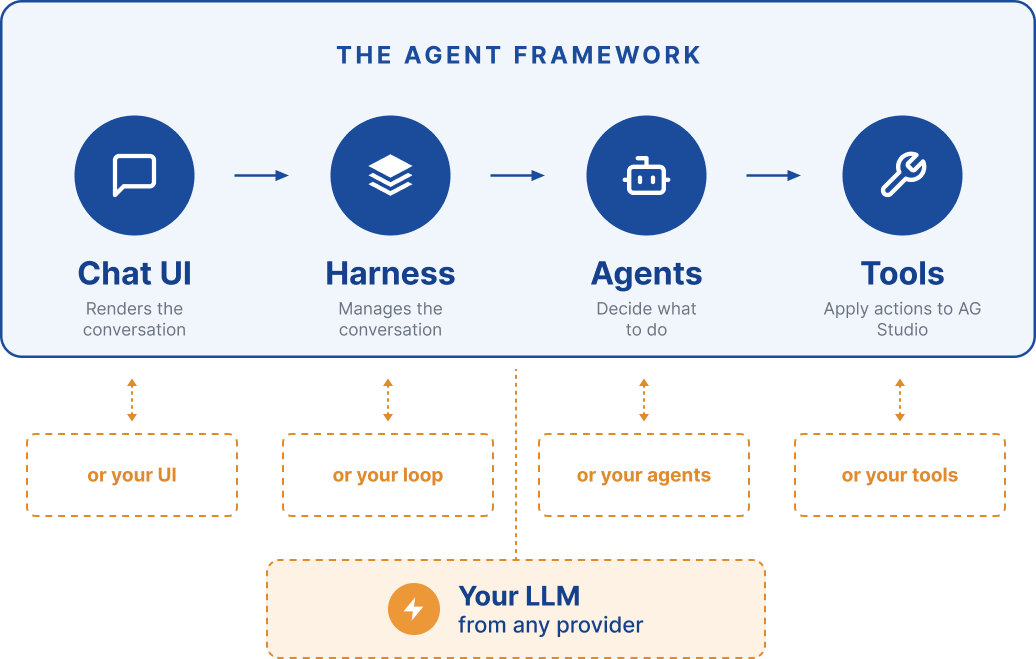
The whole framework can run out of the box, and each part can be configured or even swapped out to integrate with your existing system.
Just as important is what's not included. In Studio Agent Framework there is:
- No Model
- No Servers
- No per-query bill
- No data sent to any external services you haven't selected yourself, and no requests are ever sent to AG Grid from your application.
Most importantly, the Studio Agent Framework is opt in and will only be enabled once you have connected your own LLM.
Agents are here to stay
Whether you're an AGI maximalist, or an AI skeptic, the value that agents can already provide shows that they are not going to be leaving any time soon. We've built AG Studio to support both humans and agents from the ground. So even if you're not ready to integrate AI just yet, the Studio Agent Framework makes it as easy as flicking a switch when the time comes.
Get started with an AG Studio Trial which includes the Studio Agent Framework and you'll see for yourselves how easy AI assisted data analytics can be.