Server-side Row Grouping
This section covers Server-side Row Grouping.
Enabling Row Grouping
Row Grouping is enabled in the grid via the rowGroup column definition attribute. The example below
shows how to group rows by 'country':
For more configuration details see the section on Row Grouping.
Row Grouping on the Server
The actual grouping of rows is performed on the server when using the Server-side Row Model. When the grid needs
more rows it makes a request via getRows(params) on the
Server-side Datasource with
metadata containing pivoting details.
The properties relevant to row grouping in the request are shown below:
Note in the snippet above that rowGroupCols contains all the columns (dimensions) the grid is grouping
on, i.e. 'Country', 'Year', and groupKeys contains the list of group keys selected, i.e. ['Argentina', 2012].
Example: Server-side Row Grouping
The example below demonstrates server-side Row Grouping. Note the following:
-
Country and Sport columns have
rowGroup=truedefined on their column definitions. -
The
rowGroupColsandgroupKeysproperties in the request are used by the server to perform grouping. - Open the browsers dev console to view the request supplied to the datasource.
The example above also demonstrates Sorting with groups. When the grid sort changes, only impacted rows will get reloaded. For example if 'Sport' groups are expanded, sorting on the 'Year' column won't cause the top level 'Country' groups to reload but sorting on the 'Gold' column will.
To avoid this and always refresh top level groups regardless of which column is sorted, set the grid propertyserverSideSortingAlwaysResets = true.
Group Caches
The Server-side Cache has already been covered, however it is important to note that when rows are grouped each group node contains a cache. This is illustrated in the following diagram:
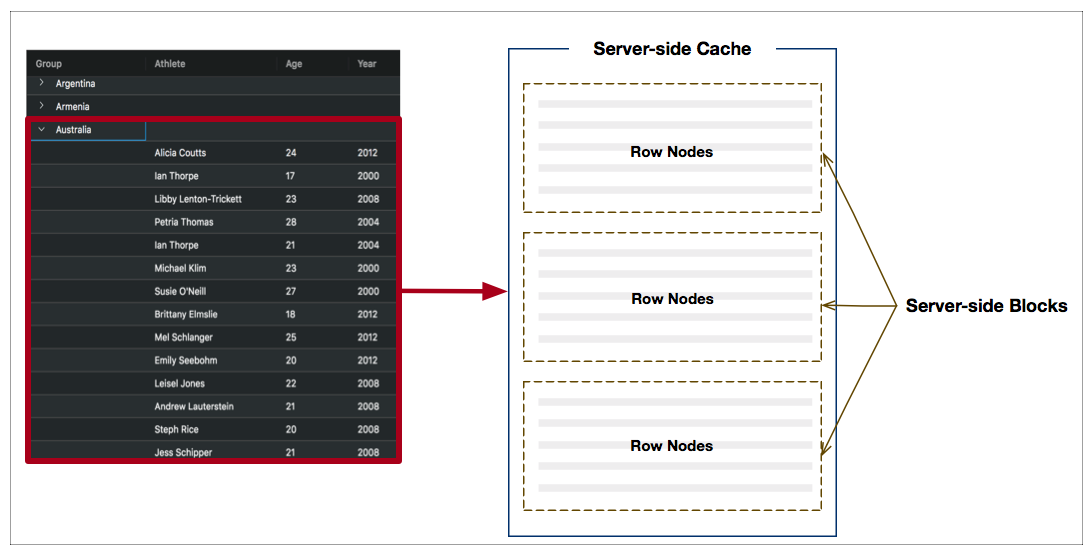
When a group node is expanded, such as 'Australia' above, a cache will be created and blocks containing rows will be loaded via the Server-side Datasource.
Providing Child Counts
By default, the grid will not show row counts beside the group names. If you do want
row counts, you need to implement the getChildCount() callback for the
grid. The callback provides you with the row data, it is your applications responsibility
to know what the child row count is. The suggestion is you set this information into
the row data item you provide to the grid.
Purging Groups
The grid has the following API to allow you to interact with the server-side cache.
| Method | Description |
|---|---|
| purgeServerSideCache(route) | Purges the cache. If you pass no parameters, then the top level cache is purged. To purge a child cache, then pass in the string of keys to get to the child cache. For example, to purge the cache two levels down under 'Canada' and then '2002', pass in the string array ['Canada','2002']. If you purge a cache, then all row nodes for that cache will be reset to the closed state, and all child caches will be destroyed. |
| getCacheBlockState() | Returns an object representing the state of the cache. This is useful for debugging and understanding how the cache is working. |
Below shows the API in action. The following can be noted:
- Button Purge Everything purges the top level cache.
- Button Purge [Canada] purges the Canada cache only. To see this in action, make sure you have Canada expanded.
- Button Purge [Canada,2002] purges the 2002 cache under Canada only. To see this in action, make sure you have Canada and then 2002 expanded.
- Button Print Block State prints the state of the blocks in the cache to the console.
-
The example implements
getChildCount()to set the child count for each group. Your application is responsible for figuring out the child count (maybe it's an attribute you set on the data?), the example sets a random number.
Preserving Group State
It may be necessary to expand groups to a desired initial state or to restore the grid to a previous state after purging / reloading data.
This can be achieved by expanding row nodes as blocks are loaded in the Server-side Datasource. The following snippet outlines a possible approach:
Notice that in step 3, newly loaded row nodes for the current block are expanded if they are defined in expandedGroupIds,
which is an array of group keys maintained by the application. This will have a cascading effect as expanding a
group will cause new block(s) to load.
In order to easily look up group row nodes, implementing the following callback is recommended: gridOptions.getRowNodeId().
In the example below, the following can be noted:
- The grid has an initial expanded group state where:
expandedGroupIds = ["Russia", "Russia-2002", "Ireland", "Ireland-2008"] - The group state is updated in
expandedGroupIdsby using listening to the grid event:RowGroupOpened. - Clicking the 'Purge Caches' button reloads data. Notice that the group state has been preserved.
Complex Columns
It is possible the data provided has composite objects, in which case it's more difficult for the grid to extract group names. This can be worked with using value getters or embedded fields (ie the field attribute has dot notation).
In the example below, all rows back are modified so that the rows looks something like this:
Then the columns are set up so that country uses a valueGetter and year uses a field
with dot notation, ie year.name
Next Up
Continue to the next section to learn how to perform Server-side Pivoting.