Server-side Configuration
This section covers the Server-side Cache and configurations available in the Server-side Row Model.
As many of the configurations available in the Server-side Row Model relate to the Server-side Cache it important to understand how the grid organises data obtained from the server into caches.
Server-side Cache
At the heart of the Server-side Row Model lies the Server-side Cache. There is a cache containing the top level rows (i.e. on the root node) and for each individual Row Grouping level.
When the grid loads it will retrieve an initial number (as per configuration) of blocks containing rows. As the user scrolls down, more blocks will be loaded via the Server-side Datasource.
The following illustration shows how the grid arranges rows into blocks which are in turn contained in a cache:
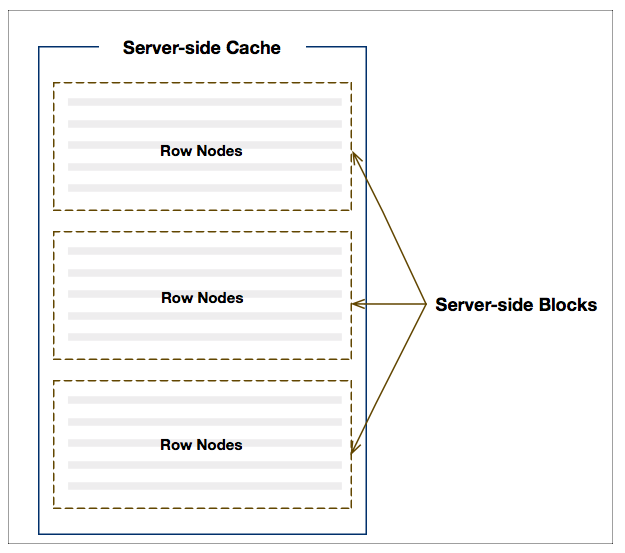
To control the browser memory footprint, server-side blocks and their containing caches are lazy-loaded, and can be configured to purge automatically or manually via API calls.
Configurations
Applications can fine tune the Server-side Row Model based on specific application requirements using the following configurations:
cacheBlockSize | How many rows for each block in the cache, i.e. how many rows returned from the server at a time. Default: 100 |
maxBlocksInCache | How many blocks to cache in the client. Default is no limit, so every requested block is kept. Use this if you have memory concerns, and block that were least recently viewed will be purged when the limit is hit. If used, make sure you have enough blocks in the cache to display one whole view of the table (i.e. what's within the scrollable area), otherwise it won't work and an infinite loop of requesting blocks will happen. |
cacheOverflowSize | When infinite scrolling is active, this says how many rows beyond the current last row the scrolls should allow to scroll. For example, if 200 rows already loaded from server, and cacheOverflowSize is 50, the scroll will allow scrolling to row 250.Default: 1 |
maxConcurrentDatasourceRequests | How many requests to hit the server with concurrently. If the max is reached, requests are queued. Default: 1 |
blockLoadDebounceMillis | Prevents blocks loading until scrolling has stopped for the specified number of milliseconds. When row count (i.e. lastRowIndex) is known, setting this property will enable skipping over blocks when scrolling. |
infiniteInitialRowCount | How many rows to initially allow the user to scroll to. This is handy if you expect large data sizes and you want the scrollbar to cover many blocks before it has to start re-adjusting for the loading of additional data. |
purgeClosedRowNodes | When enabled, closing group row nodes will purges all caches beneath closed row nodes. This property only applies when there is Row Grouping. |
serverSideSortingAlwaysResets | When enabled, always refreshes top level groups regardless of which column was sorted. This property only applies when there is Row Grouping. |
Cache Debugging
When experimenting with different configurations it is useful to enable debug mode as follows:
The screenshot below is taken from the browsers dev console when debug is enabled:

Notice that the current cache status is logged showing block details such as the startRow and
endRow.
This can be very useful when debugging issues on the server.
Example: Block Loading Debounce
The example below demonstrates a number of the configurations listed in this section and shows how adding a debounce to block loading allows for quick scrolling over rows. Note the following:
cacheBlockSize=200- fetches 200 rows per request instead of 100 by default.-
maxBlocksInCache=10- once a cache contains 10 blocks the oldest blocks will be purged to ensure the cache is constrained to 10 blocks. By default all blocks are kept. -
blockLoadDebounceMillis=100- loading of blocks is delayed by100ms. This allows for skipping over blocks when scrolling to advanced positions. Note that the last row index should be supplied insuccessCallback(rows, lastRow)so that the scrollbars are sized correctly. debug=true- open the browsers dev console to view the cache status and block details.
Next Up
Continue to the next section to learn about Server-side Sorting.