Infinite Scroll
This section introduces the Server-side Row Model with lazy loading of data fetched through an infinite scroll.
As a gentle introduction to the Server-side Row Model, this section will cover the simplest use case of infinite
scrolling without any grouping, filtering, sorting or pivoting.
Enabling Server-side Row Model
By default the grid will use the Client-side Row Model, so
to enable the Server-side Row Model define the rowModelType as follows:
gridOptions.rowModelType = 'serverSide'
Implementing the Server-side Datasource
The previous section outlined the interfaces associated with the Server-side Datasource.
The following snippet outlines how to implement a ServerSideDatasource and then register it with the grid:
// create ServerSideDatasource with a reference to your server
function ServerSideDatasource(server) {
this.server = server;
}
ServerSideDatasource.prototype.getRows = function(params) {
// invoke your server with request params supplied by grid
var response = server.getResponse(params.request);
if (response.success) {
// call the success callback
params.successCallback(response.rows, response.lastRow);
} else {
// inform the grid the request failed
params.failCallback();
}
};
// register Server-side Datasource with the grid
var server = getServer();
var datasource = new ServerSideDatasource(server);
gridOptions.api.setServerSideDatasource(datasource);
Server-side Cache
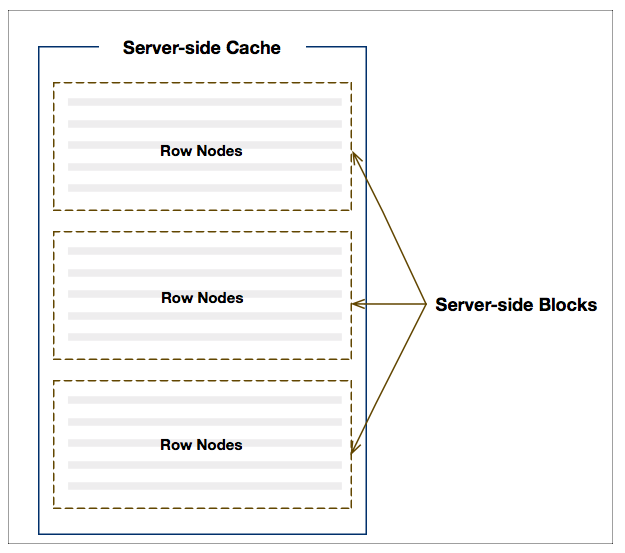
At the heart of the Server-side Row Model lies the Server-side Cache. When there are no row groups, like in the
example covered in this section, a single cache will be associated with the root level node.
When the grid loads it will retrieve an initial number (as per configuration) of blocks containing rows. As the user
scrolls down, more blocks will be loaded via the server-side datasource.
The following illustration shows how the grid arranges rows in blocks which are in turn contained in a cache:
To control the browser memory footprint, server-side blocks and their containing caches are lazy-loaded, and can
be configured to purge automatically or manually via API calls.
Cache Configuration
| Property |
Description |
| cacheOverflowSize |
When infinite scrolling is active, this says how many rows beyond the current last row
the scrolls should allow to scroll. For example, if 200 rows already loaded from server,
and overflowSize is 50, the scroll will allow scrolling to row 250. Default is 1.
|
| maxConcurrentDatasourceRequests |
How many requests to hit the server with concurrently. If the max is reached, requests are queued.
Default is 1, thus by default, only one request will be active at any given time. |
| maxBlocksInCache |
How many blocks to cache in the client. Default is no limit, so every requested
block is kept. Use this if you have memory concerns, so blocks least recently viewed are purged.
If used, make sure you have enough blocks in the cache to display one whole view of the table
(ie what's within the scrollable area), otherwise it won't work and an infinite loop of
requesting blocks will happen.
|
| cacheBlockSize |
How many rows for each block in the cache.
|
| purgeClosedRowNodes |
When enabled, closing group row nodes will purges all caches beneath closed row nodes. This property only
applies when there is Row Grouping.
|
| serverSideSortingAlwaysResets |
When enabled, always refreshes top level groups regardless of which column was sorted. This property only
applies when there is Row Grouping.
|
Example - Infinite Scroll
The example below demonstrates infinite scrolling along with some of the above configuration options:
- Enabling Server-side Row Model: via the grid options property:
rowModelType = 'serverSide'.
- Lazy-loading: with the grid options property:
cacheBlockSize = 100 data will be fetched
in blocks of 100 rows at a time.
- Auto Purge Cache: to limit the amount of data cached in the grid you can set
maxBlocksInCache
via the gridOptions.
Next Up
Continue to the next section to see how to lazy load data with: Row Grouping.