Row Models
Depending on your needs, the grid can be configured with different row models. The row models
differ in how the data is loaded. You can load all the data and hand it
over to the grid (Client-side Row Model) or you can keep most of the data on the server
and lazy-load based on what is currently visible to the user (Infinite,
Viewport and Server-side Row Models).
The following is a summary of the different row models:
Client-side
This is the default. The grid will load all of the data into the grid in one go.
The grid can then perform filtering, sorting, grouping, pivoting and aggregation all in memory.
Go to Client-side Row Model
Infinite
This will present the data to
the user and load more data as the user scrolls down.
Use this if you want to display a large flat (not grouped) list of data.
Go to Infinite Row Model
Server-side
the Server-side Row Model builds on Infinite. It also lazy loads the data as the user scrolls down. In addition it
allows lazy loading of grouped data with server-side grouping and aggregation.
Advanced users will use Server-side Row Model to do ad-hoc slice and dice of data with server-side aggregations.
Go to Server-side Row Model
Viewport
The grid will inform the server exactly what data it is displaying (first and last row) and the
server will provide data for exactly those rows only. Use this if you want the server to know exactly
what the user is viewing, useful for updates in very large live datastreams where server only
sends updates to clients viewing the impacted rows.
Go to Viewport Row Model
What row model you use is set as a grid property rowModelType. Set it to one of
clientSide, infinite, viewport, serverSide. The default is clientSide.
When to Use
Which row model you use will depend on your application. Here are some quick rules of thumb:
-
If using ag-Grid Free, use Client-side Row Model if you want to load all
your data into the browser, or Infinite Row Model if you want to load it in blocks.
-
If using ag-Grid Enterprise, use Client-side Row Model if you want to load all
your data into the browser, or Server-side Row Model if you want to load it in blocks.
Server-side Row Model is Infinite Row Model plus more. So if you are an
ag-Grid Enterprise customer, you should prefer Server-side Row Model over Infinite Row Model.
-
Don't use Viewport Row Model unless you understand what its advantages are and when
you need them. We find many of our users use Viewport Row Model when they
don't need to and end up with more complicated applications as a result.
Here are more detailed rules of thumb.
-
If you are not sure, use default Client-side.
The grid can handle massive (100k+) amounts of data. The grid will only
render what's visible on the screen (40 rows approximately, depending on your screen size) even if you have thousands of rows returned from your
server. You will not kill the grid with too much data - rather your browser will run out of memory before
the grid gets into problems. So if you are unsure, go with Client-side row model first and only change if you need to.
With Client-side, you get sorting, filtering, grouping, pivoting and aggregation all done for you by the grid.
All of the examples in the documentation use the Client-side model unless specified
otherwise.
-
If you do not want to shift all the data from your server to your client, as the amount of data is too
large to shift over the network or to extract from the underlying datasource, then use either infinite,
server-side or viewport. Each one takes data from the server in different ways.
-
Use Infinite or
Server-side
to bring back a list of data one block at a time from the server.
As the user scrolls the grid will ask for more rows.
Server-side has more features than Infinite and will allow row grouping, aggregation,
lazy loading of groups and slice and dice of data.
-
Use Viewport if you want the server to know exactly what the user is looking at.
This is best when you have a large amount of changing data and want to push updates
to the client when the server-side data changes. Knowing exactly what the user is looking
at means you only have to push updates to the relevant users. All the row models can receive
updates however only the Viewport row model provides the server with the information of the rows
the users currently sees on screen without scrolling.
Row Model Comparisons
Below is a quick feature comparison of all the grids features across all four row models.
Deeper Understanding of Row Models
The grid follows an MVC pattern. Each data item is wrapped in a Row Node and then
stored in the Row Model. The grid rendering engine is called Row Renderer
and listens for changes to the row model and updates the DOM accordingly.
Below shows a simplified version of a class diagram showing the relationships between the major classes
involved with the row models.
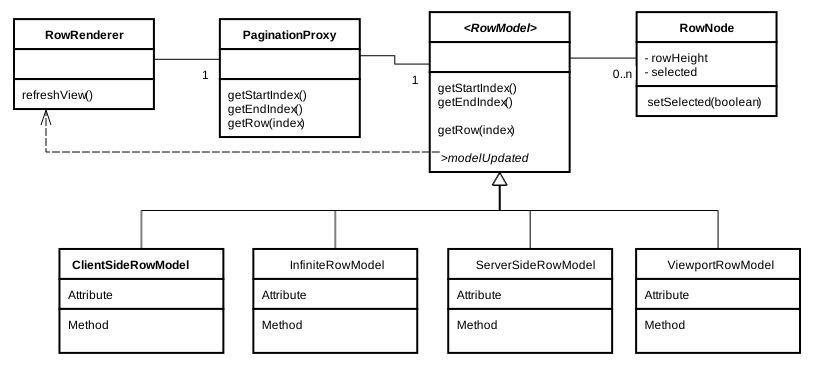
The following should be noted from the diagram:
-
The grid has exactly one
RowRenderer instance. The RowRenderer contains a reference to the PaginationProxy
where it asks for the rows one at a time for rendering.
-
The grid has exactly one
PaginationProxy instance. The PaginationProxy will either a) do nothing
if pagination is not active and just forward all requests to the Row Model or b) do pagination if
pagination is active. The PaginationProxy has exactly one RowModel instance.
-
You can configure the grid to use any of the provided Row Models - that's why RowModel is in
italics, it means it's an interface, the concrete implementation is what you decide when configuring the grid.
The RowModel contains a list of RowNodes. The RowModel may have a list of all the RowNodes (Client-side Row Model) or have
a DataSource where it can lazy load RowNodes
-
A RowNode has a reference to exactly one row data item (the client application provides
the row data items). The RowNode has state information about the row item, such as whether it is
selected and the height of it.
-
When there is a change in state in the RowNodes, the RowModel fires a modelUpdated
event which gets the RowRenderer to refresh. This happens for many reasons, or example the
data is sorted, filtered, a group is opened, or the underlying data has changed.
Pagination
Pagination can be applied to any of the row model types. The documentation on each row model
type covers pagination for that row model type.
Grid Datasource
The Client-side row model does not need a datasource.
Infinite,
Viewport and
Server-side all use a datasource. The documentation
on each row model type explains how to configure the datasource for the particular row model.