Server-side operations with GraphQL
Learn how to perform server-side operations using GraphQL with a complete reference implementation that uses
the MySQL database.
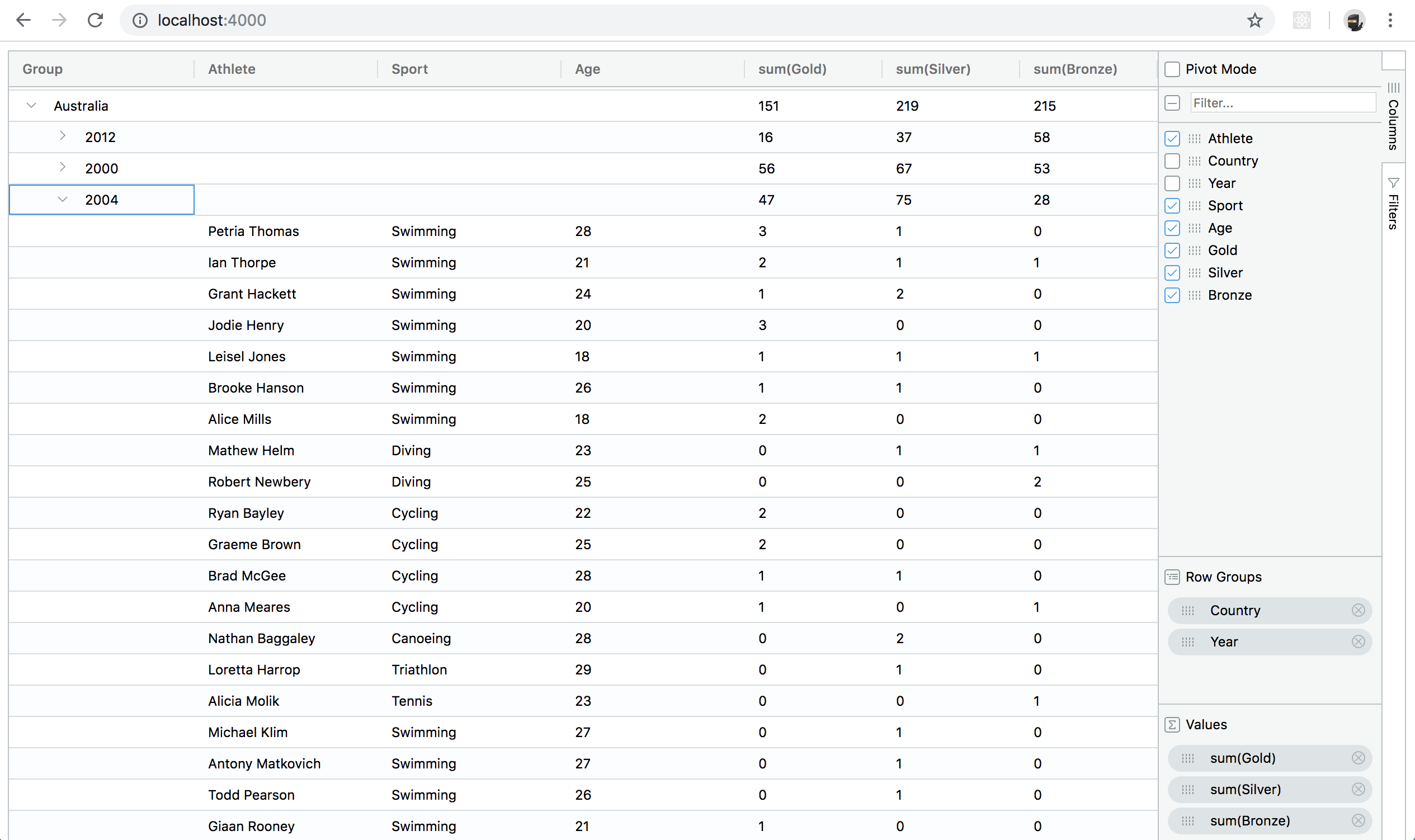
This guide we will develop an Olympic Medals application that demonstrates how to integrate a GraphQL endpoint
with ag-Grid's Server-side Row Model. Specifically it will
show how can be lazy-loaded as required, even when performing group, filter, sort operations when working
with large datasets.
The following screenshot shows what the finished application looks like:
The reference implementation covered in this guide is for demonstration purposes only. If you use
this in production it comes with no warranty or support.
The source code can be found here:
https://github.com/ag-grid/ag-grid-server-side-graphql-example.
Overview
In recent years GraphQL has become a popular alternative to REST when fetching data for clients. Familiarity
with GraphQL is assumed however the following; Introduction to GraphQL
should provide all the necessary background information to follow this guide.
One of the main benefits of GraphQL is the ability to expose a single endpoint and schema which maps to numerous
data sources. However in our Olympic Medals application we will keep things simple by using just a single
MySQL datasource.
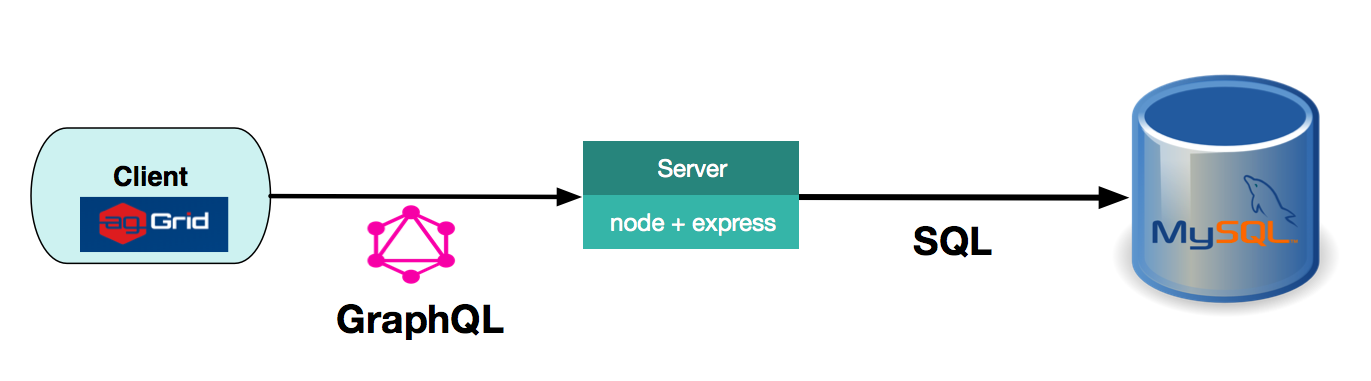
In our application, the GraphQL endpoint will be hosted using a web server comprised of
Node.js running Express.js. An overview
of technologies used in this guide is illustrated in the diagram below:
We will now proceed and to install and run the application before going through the implementation details.
Download and Install
Clone the example project using:
git clone https://github.com/ag-grid/ag-grid-server-side-graphql-example.git
Navigate into the project directory:
cd ag-grid-server-side-graphql-example
Install project dependencies and build project using:
yarn install
Database Setup
Download and install the database as per the MySql Download
documentation.
Create a database with the name 'sample_data'. Then run the following script to create the table
olympic_winners and populate it with data via the mysql command line:
mysql -u root -p -D sample_data < ./data/olympic_winners.sql
That's it. We are now ready to run and explore the application.
Running the application
To run the application execute the following from the command line:
yarn start
Then point your browser to http://localhost:4000/
Defining the GraphQL schema
To keep things simple, our schema will just contain a single entity OlympicWinner.
// server/schema.js
type OlympicWinner {
athlete: String
country: String
age: Int
sport: String
year: Int
gold: Int
silver: Int
bronze: Int
}
A single rows query is also defined along with it's supporting input types and enums:
// server/schema.js
type Query {
rows(
startRow: Int,
endRow: Int,
sorting: [SortModel],
rowGroups: [RowGroup],
groupKeys: [String]
): [OlympicWinner]!
}
input SortModel {
colId: String
sort: String
}
input RowGroup {
colId: String
aggFunc: String
}
The input types defined in the schema directly map to the
IServerSideGetRowsRequest.
We will discuss these mappings in detail in the following sections.
The corresponding rows resolver function is implemented as follows:
// server/schema.js
import {fetchRows} from "./olympicService";
const resolvers = {
Query: {
rows: (obj, args) =>
new Promise((resolve, reject) => {
const resultCallback = (err, results) => err ? reject(err) : resolve(results);
fetchRows(args, resultCallback);
}).then(rows => rows)
},
};
The OlympicService simply takes the query arguments and uses dynamic SQL techniques to construct
the corresponding SQL queries. The implementation details will be omitted from this guide but can be examined
in the project repository.
The GraphQL schema created using the makeExecutableSchema helper function from the
graphql-tools package, by combining the schema typeDefs along with the corresponding
resolvers package as follows:
// server/schema.js
const schema = makeExecutableSchema({
typeDefs,
resolvers,
});
export default schema;
GraphQL Endpoint
Hosting our GraphQL endpoint is done with the help of the express-graphql npm package. It is supplied
with the schema we defined above.
// server/server.js
import express from 'express';
import graphqlHTTP from 'express-graphql';
import schema from './schema';
const app = express();
app.use('/graphql', graphqlHTTP({ schema: schema, graphiql: true }));
app.listen(4000, () => {
console.log('Started on localhost:4000');
});
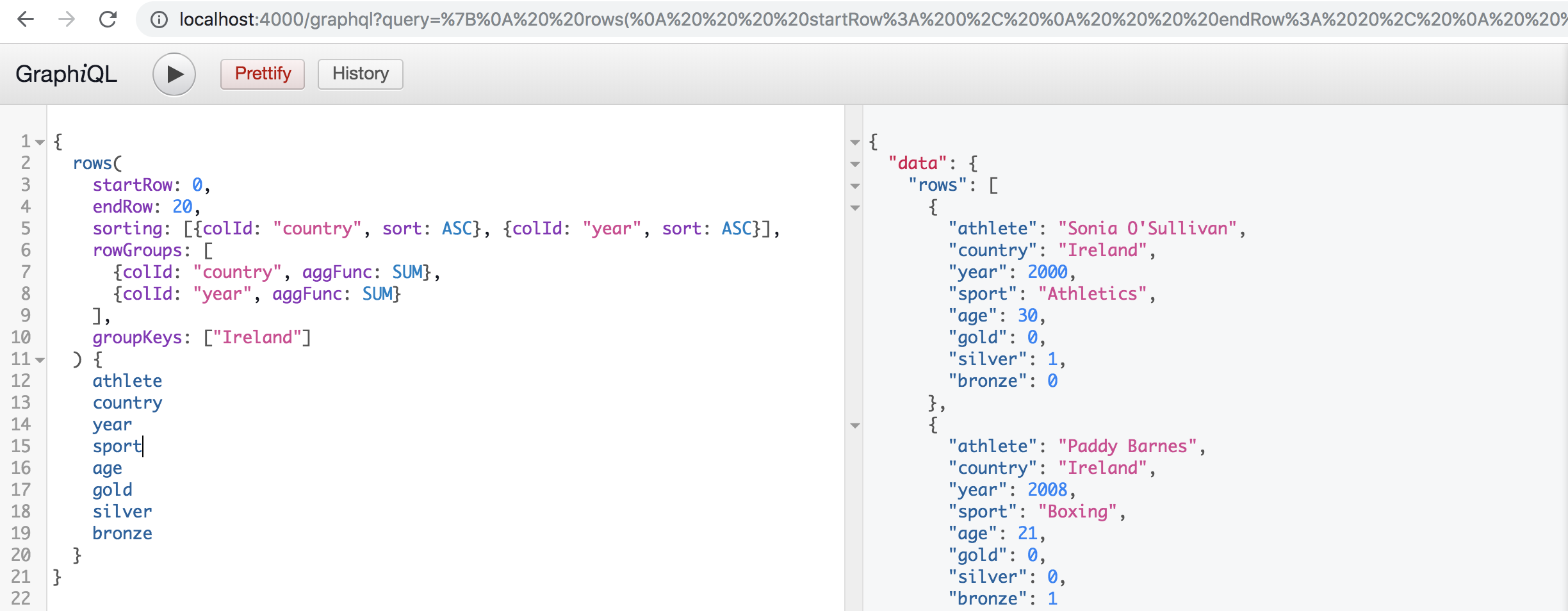
Notice that we have supplied the option: graphiql: true to enable the GraphiQL, client which is a
useful tool for testing queries during development, and is available at:
http://localhost:4000/graphql.
Server-side Datasource
In order to fetch data for the Server-side Row Model we must implement the IServerSideDatasource,
which contains a single method getRows(params) which accepts request params from the grid.
To retrieve data from our GraphQL endpoint we will use the
Apollo client. The response is then passed back to the grid
via the params.successCallback(rows, lastRow) as shown below:
// client/serverSideDatasource.js
class ServerSideDatasource {
constructor(gridOptions) {
this.gridOptions = gridOptions;
this.client = new ApolloClient({uri: "http://localhost:4000/graphql/"});
}
getRows(params) {
const columns = this.gridOptions.columnDefs;
// query GraphQL endpoint
this.client.query(query(params.request, columns))
.then(response => {
const rows = response.data.rows;
// determine last row to size scrollbar and last block size correctly
let lastRow = -1;
if (rows.length <= this.gridOptions.cacheBlockSize) {
lastRow = params.request.startRow + rows.length;
}
// pass results to grid
params.successCallback(rows, lastRow);
})
.catch(err => {
console.error(err);
params.failCallback()
});
}
}
The IServerSideGetRowsRequest supplied in the params is simply mapped to our GraphQL
queries input params as shown below:
// client/serverSideDatasource.js
const query = (request, columns) => {
return {
query: gql`
query GetRows($start: Int, $end: Int, $sortModel: [SortModel], $groups: [RowGroup], $groupKeys: [String]) {
rows(
startRow: $start,
endRow: $end,
sorting: $sortModel,
rowGroups: $groups,
groupKeys: $groupKeys
) {
${getFields(columns)}
}
}
`,
variables: {
start: request.startRow,
end: request.endRow,
sortModel: mapSortModel(request),
groups: mapGroups(request),
groupKeys: mapGroupKeys(request)
},
}
};
const getFields = (columnDefs) => {
return columnDefs.map(colDef => colDef.field).join();
};
const mapGroups = (request) => {
return request.rowGroupCols.map(grp => {
return { colId: grp.field }
});
};
const mapGroupKeys = (request) => {
return request.groupKeys.map(key => key.toString());
};
const mapSortModel = (request) => {
return request.sortModel.map(srt => {
return { colId: srt.colId, sort: srt.sort }
});
};
Note that we are using the Apollo graphql-tag package
to help create the GraphQL AST.
The ServerSideDatasource is then registered with the grid via the grid api as follows:
// client/index.js
const datasource = new ServerSideDatasource(gridOptions);
gridOptions.api.setServerSideDatasource(datasource);
Conclusion
In this guide we presented a reference implementation for integrating the Server-side Row Model with GraphQL
server hosted in node and connected to a MySQL database. This included all necessary configuration and install
instructions.
A high level overview was given to illustrate the problem this approach solves before providing details of how
to achieve the following server-side operations:
- Infinite Scrolling
- Sorting
- Grouping