Infinite Row Model
If you are an enterprise user you should consider using the Server-side row model
instead of the infinite row model. It offers the same functionality with many more features.
The differences between row models can be found in our row models summary page
Infinite scrolling allows the grid to lazy load rows from the server depending on what
the scroll position is of the grid. In its simplest form, the more the user scrolls
down, the more rows get loaded.
The grid will have an 'auto extending' vertical scroll. That means as the scroll reaches
the bottom position, the grid will extend the height to allow scrolling even further down,
almost making it impossible for the user to reach the bottom. This will stop happening
once the grid has extended the scroll to reach the last record in the table.
How it Works
The grid will ask your application, via a datasource, for the rows in blocks.
Each block contains a subset of rows of the entire
data set. The following diagram is a high level overview.
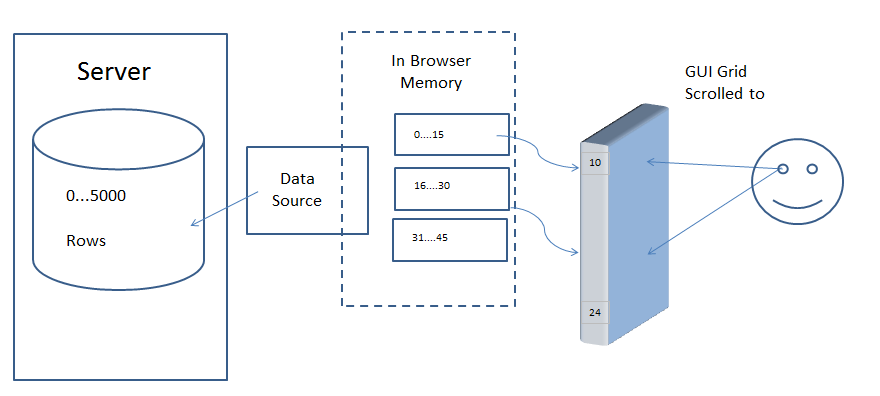
When the grid scrolls to a position where there is no corresponding block of rows loaded, the model
uses the provided datasource to get the rows for the requested block.
In the diagram, the datasource is getting the rows from a database in a remote server.
Turning On Infinite Scrolling
To turn on infinite scrolling, you must a) set the grid property rowModelType to 'infinite' and b) provide a datasource.
// before grid initialised
gridOptions.rowModelType = 'infinite';
gridOptions.datasource = myDataSource;
// after grid initialised, you can set or change the datasource
gridOptions.api.setDatasource(myDataSource);
Datasource
A datasource must be provided to do infinite scrolling. You specify the datasource as a grid property
or using the grid API.
// set as a property
gridOptions.datasource = myDatasource;
// or use the api after the grid is initialised
gridOptions.api.setDatasource(myDatasource);
Changing the Datasource
Changing the datasource after the grid is initialised will reset the infinite scrolling in the grid.
This is useful if the context of your data changes, ie if you want to look at a different set of data.
If you call setDatasource() the grid will act assuming
it's a new datasource, resetting the block cache. However you can pass in the same datasource instance.
So your application, for example, might have one instance of a datasource that is aware of some
external context (eg the business date selected for a report, or the 'bank ATM instance' data you are
connecting to), and when the context changes, you want to reset, but still keep the same datasource
instance. In this case, just call setDatasource() and pass the same datasource in again.
Datasource Interface
In a nutshell, every time the grid wants more rows, it will call getRows() on the datasource.
The datasource responds with the rows requested. Your datasource for infinite scrolling should
implement the following interface:
// Infinite Scrolling Datasource
interface IDatasource {
// Callback the grid calls that you implement to fetch rows from the server. See below for params.
getRows(params: IGetRowsParams): void;
// optional destroy method, if your datasource has state it needs to clean up
destroy?(): void;
}
The getRows() method takes the following parameters:
// Params for the above IDatasource.getRows()
interface IGetRowsParams {
// The first row index to get.
startRow: number;
// The first row index to NOT get.
endRow: number;
// If doing Server-side sorting, contains the sort model
sortModel: any,
// If doing Server-side filtering, contains the filter model
filterModel: any;
// The grid context object
context: any;
// Callback to call when the request is successful.
successCallback(rowsThisBlock: any[], lastRow?: number): void;
// Callback to call when the request fails.
failCallback(): void;
}
getRows()
The getRows() function is called by the grid to load a block of rows into the browser side cache of blocks.
It takes the following as parameters:
-
The startRow and endRow define the range expected for the call. For example, if block
size is 100, the getRows function will be called with `startRow: 0` and `endRow: 100` and the grid will
expect a result with 100 rows (that's rows 0 to 99).
-
The successCallback(rowsThisBlock, lastRow) should be called when you successfully receive data
from the server. The callback has the following parameters:
- rowsThisBlock should be the rows you have received for the current block.
- lastRow should be the index of the last row if known.
-
The failCallback() should be called if the loading failed. Either one of
successCallback() or failCallback() should be called exactly once.
-
The filterModel() and sortModel() are passed for doing Server-side sorting and filtering.
-
The context is just passed as is
and nothing to do with infinite scrolling. It's there if you need it for providing
application state to your datasource.
Setting Last Row Index
The success callback parameter lastRow is used to move the grid out of infinite scrolling.
If the last row is known, then this should be the index of the last row. If the last row is unknown,
then leave blank (undefined, null or -1). This attribute is only used when in infinite scrolling.
Once the total record count is known, the lastRow parameter will be ignored.
Under normal operation, you will return null or undefined for lastRow for every time getRows() is called
with the exception of when you get to the last block. For example, if block size is 100 and you have 250 rows,
when getRows() is called for the third time, you will return back 50 rows in the result and set rowCount to 250.
This will then get the grid to set the scrollbar to fit exactly 250 rows and will not ask for any more blocks.
Block Cache
The grid keeps the blocks in a cache. You have the choice to never expire the blocks, or to set a
limit to the number of blocks kept. If you set a limit, then as you scroll down, previous blocks
will be discarded and will be loaded again if the user scrolls back up. The maximum blocks to keep
in the cache is set using the maxBlocksInCache property.
Block Size
The block size is set using the grid property cacheBlockSize. This is how many rows each block in the
cache should contain.
Each call to your datasource will be for one block.
Debounce Block Loading
It is also possible to debounce the loading to prevent blocks loading until scrolling has stopped. This
can be configured using: blockLoadDebounceMillis.
Aggregation and Grouping
Aggregation and grouping are not available in infinite scrolling.
This is because to do such would require the grid knowing the entire data set,
which is not possible when using the infinite row model. If you need aggregation and / or
grouping for large datasets, check the Server-side
Row Model for doing aggregations on the Server-side.
Sorting & Filtering
The grid cannot do sorting or filtering for you, as it does not have all of the data.
Sorting or filtering must be done on the Server-side. For this reason, if the sort or filter
changes, the grid will use the datasource to get the data again and provide the sort and filter
state to you.
Simple Example - No Sorting or Filtering
The example below makes use of infinite scrolling and caching.
Notice that the grid will load more data when you bring the scroll all the way to the bottom.
Selection
Selection works on the rows in infinite scrolling by using the ID of the row node. If you do not
provide ids for the row nodes, the index of the row node will be used. Using the index of the
row breaks down when (Server-side) filtering or sorting, as these change the index of the rows.
For this reason, if you do not provide your own ids, then selection is cleared if sort or
filter is changed.
To provide your own ids, implement the method getRowNodeId(data), which takes the data
and should return the id for the data.
gridOptions.getRowNodeId: function(item) {
// the id can be any string, as long as it's unique within your dataset
return item.id.toString();
}
Once you have getRowNodeId() implemented, selection will persist across sorts and filters.
Example - Sorting, Filtering and Selection
The following example extends the example above by adding Server-side sorting, filtering and
persistent selection.
Any column can be sorted by clicking the header. When this happens, the datasource is called
again with the new sort options.
The columns Age, Country and Year can be filtered.
When this happens, the datasource is called again with the new filtering options.
When a row is selected, the selection will remain inside the grid, even if the grid gets sorted
or filtered. Notice that when the grid loads a selected row (eg select first row, scroll down
so the first block is removed form cache, then scroll back up again) the row is not highlighted
until the row is loaded from the server. This is because the grid is waiting to see what the id
is of the row to be loaded.
The example below uses ag-Grid-Enterprise, this is to demonstrate the set filter with Server-side
filtering, ag-Grid-Enterprise is not required for infinite scrolling.
When filtering using the Infinite Row Model it's important to specify the filter parameter: newRowsAction: 'keep'.
This is to prevent the filter from being reset.
When performing multiple row selections using shift-click, it is possible that not all rows are available in
memory if the configured value of maxBlocksInCache doesn't cover the range. In this case multiple selections
will not be allowed.
Specify Selectable Rows
It is also possible to specify which rows can be selected via the gridOptions.isRowSelectable()
callback function.
For instance if we only wanted to allow rows where the data.country property is the
'United States' we could implement the following:
gridOptions.isRowSelectable: function(data) {
return data.country === 'United States';
}
Note that in the above example we have also included an optional checkbox to help highlight which rows
are selectable.
Configuring A Bit Differently
The examples above use old style JavaScript objects for the datasource. This example turns things around slightly
and creates a datasource Class. The example also just creates (makes up) data on the fly.
Loading Spinner
The examples on this page use a loading spinner to show if the row is waiting for its data to be loaded. The
grid does not provide this, rather it is a simple rendering technique used in the examples. If the data
is loading, then the rowNode will have no id. So if you use the id as the value, the cell will get refreshed
when the id is set.
loadingSpinnerColumn = {
// use a value getter to have the node id as this columns value
valueGetter: 'node.id',
// then a custom cellRenderer
cellRenderer: function(params) {
if (params.value === undefined) {
// when no node id, display the spinner image
return '<img src="loading.gif">'
} else {
// otherwise just display node id (or whatever you wish for this column)
return params.value;
}
}
}
Refer to section Cell Rendering for how to build
cell renderers.
More Control via Properties and API
Infinite scrolling has a cache working behind the scenes. The following properties and API are provided
to allow you control of the cache.
Properties
| Property |
Description |
| cacheOverflowSize |
When infinite scrolling is active, this says how many rows beyond the current last row
the scrolls should allow to scroll. For example, if 200 rows already loaded from server,
and overflowSize is 50, the scroll will allow scrolling to row 250. Default is 1.
|
| maxConcurrentDatasourceRequests |
How many requests to hit the server with concurrently. If the max is reached, requests are queued.
Default is 1, thus by default, only one request will be active at any given time. |
| maxBlocksInCache |
How many blocks to cache in the client. Default is no limit, so every requested
block is kept. Use this if you have memory concerns, so blocks least recently viewed are purged.
If used, make sure you have enough blocks in the cache to display one whole view of the table
(ie what's within the scrollable area), otherwise it won't work and an infinite loop of
requesting blocks will happen.
|
| cacheBlockSize |
How many rows for each block in the cache.
|
API - Infinite Scrolling
| Method |
Description |
| refreshInfiniteCache() |
Marks all the currently loaded blocks in the cache for reload. If you have 10 blocks in the cache,
all 10 will be marked for reload. The old data will continue to be displayed until the new data
is loaded. |
| purgeInfiniteCache() |
Purges the cache. The grid is then told to refresh. Only the blocks required to display the current
data on screen are fetched (typically no more than two). The grid will display nothing while the new
blocks are loaded. Use this to immediately remove the old data from the user. |
| getInfiniteRowCount() |
The row count defines how many rows the grid allows scrolling to.
|
| isMaxRowFound() |
The property maxRowFound is a boolean, true or false. When false, then the grid will allow scrolling beyond
the rowCount looking for more rows. When the last row is found, maxRowFound becomes true, and the
grid will only scroll to the last available row as it has finished looking for more data. |
| setInfiniteRowCount(rowCount, maxRowFound) |
Sets the rowCount and maxRowFound properties. The second parameter, maxRowFound, is optional and if
left out, only rowCount is set. Set rowCount to adjust the height of the vertical scroll. Set maxRowFound
to enable / disable searching for more rows. Use this method if you add or remove rows into the dataset
and need to reset the number of rows or put the data back into 'look for data' mode.
|
| getCacheBlockState() |
Returns an object representing the state of the cache. This is useful for debugging and understanding
how the cache is working. |
API - Inserting / Removing Rows
| Method |
Description |
| insertItemsAtIndex(index, items) |
Inserts items at the provided location inside the grid. If you use this, you MUST ensure that the data
store you are sourcing from (eg the database) is also updated, as the subsequent cache block loads will
need to be consistent with what is inside the grid. Doing an insert will require rows to be moved
after the insert location (pushed down to make room) - this can leave blank rows in blocks in the cache
(if a block has to be moved down, and the previous block is not loaded for it to take rows from). If this
is the case, then the block will be marked for a refresh.
Inserting rows into the infinite scrolling row model allows for your grid to be out of sync with the
underlying data store and hence can either cause synchronisation issues, or simply difficult code to
maintain even if you get it right, especially in multi-user environments. It is strongly suggested you
don't use the insertItemsAtIndex() method, rather you update the source and then refresh the cache.
|
| removeItems(rowNodes) |
This method is not supported by infinite scrolling. It is not supported as the grid has no way of knowing
the index of the rowNodes to be removed if the data is not currently loaded into the cache. |
| addItems(dataItems) |
This method is not supported by infinite scrolling. It is not supported as the grid has no way of knowing
the end of the data dataset to be appended to if the data is not currently loaded into the cache.
|
Adding / removing rows directly in the grid for infinite scrolling is not recommended as it will complicate
your application. It will make your life easier if you update the data on the server and refresh the block cache.
Example - Using Cache API Methods
Below demonstrates the different api methods via the buttons. The example outputs a lot of debugging items
to the console because the grid property debug=true is set. The buttons are as follows:
-
Inject 1 Row @ 2 / Inject 5 Row @ 2: Inserts either one or five rows at location index 2.
-
Insert 1 Row @ 2 and Refresh: Inserts five rows at location index 2 and then gets grid to refresh.
-
Delete 10 Rows @ 3: Deletes rows from the server, then gets the grid to refresh.
-
Set Row Count to 200: Sets the row count to 200. This adjusts the vertical scroll to
show 200 rows. If the scroll is positioned at the end, this results in the grid automatically readjusting
as it seeks ahead for the next block of data.
-
Print Rows and Max Found: Debugging method, prints rowCount and maxFound to the console.
-
Jump to 500: Positions the grid so that row 500 is displayed.
-
Print Cache State: Debugging method, to see the state of the cache.
-
Set Prices High & Set Prices Low: Sets the prices ON THE Server-side to either high or low prices.
This will not impact the grid until after a block cache is loaded. Use these buttons to then further
test the refresh and purge methods.
-
Refresh Cache: Calls for the cache to be refreshed.
-
Purge Cache: Calls for the cache to be purged.
The example also makes each Honda row bold - demonstrating that the callbacks getRowStyle and getRowClass
get called after the data is set as well as when the row is created (when the data may not yet be available).
Changing Columns
Changing columns
is possible using infinite scroll and it does not require the data getting fetched again
from the server. If the change of columns impacts the sort or filter (ie a column with a sort
of filter applied is removed), then the grid will fetch data again similar to how data is
fetched again after the user changes the sort or filter explicitly.
The example below demonstrates changing columns on the infinite row model. The following
can be noted:
- Hit the buttons 'Show Year' and 'Hide Year'. Notice that the data is not re-fetched.
-
Add a sort or filter to Age column. When the sort or filter is applied the data is re-fetched.
However once fetched, you can add and remove the Year column without re-fetching the data.
-
Add a sort or filter to the Year column. When the sort or filter is applied the data
is re-fetched. Now remove the Year column and the data is re-fetched again as the sort or
filter has changed.
As with all row models, it is possible to enable pagination with infinite scrolling.
With infinite scrolling, it is possible to mix and match with the configuration to
achieve different effects. The following examples are presented:
| Example |
Page Size |
Block Size |
Comment |
| Example 1 |
Auto |
Large |
Most Recommended |
| Example 2 |
Equal |
Equal |
Recommended Sometimes |
Having smaller infinite blocks size than your pagination page size is not supported
You must have infinite block size greater than or equal to the pagination page size.
If you have a smaller block size, the grid will not fetch enough rows to display
one page. This breaks how infinite scrolling works and is not supported.
Example 1: Auto Pagination Page Size, Large Infinite Block Size
This example is the recommended approach. The infinite block size is larger than the pages size,
so the grid loads data for a few pages, allowing the user to hit 'next' a few times before a server
sided call is needed.
Example 2: Equal Pagination Page Size and Large Infinite Block Size
This example demonstrates having the page and block sizes equal. Here the server is hit
every time a new page is navigated to.
Overlays
The infinite row model does not use overlays
like the Client-side Row Model. The does not
use 'loading' overlay as rows load in blocks as it would be wrong to hide all the grid
because some rows are getting loaded. The grid does not use 'no rows' overlay as the
'no rows' could be because you have a filter set, and a grid with a filter shows an empty
grid when no rows pass the filter.
If you do want to show overlays, then please see
overlays section for details on how to show
the overlays manually.