Cell Renderer
The job of the grid is to lay out the cells. By default the grid will create the cell values
using simple text. If you want more complex HTML inside the cells then this is achieved using
cell renderers.
This page explains first how to create cell renderers using standard JavaScript. It then continues
on how to create cell renderers using components of different frameworks (eg how to create a cell
renderer using a React or Angular component). If you intend to use the framework variant, you should
first read the JavaScript sections as the framework sections build on this.
Simple Cell Renderer Example
The example below shows a simple cell renderer in action. It uses a cell renderer to show a hash '#'
symbol instead of the medal count.
Cell Renderer Component
The interface for the cell renderer component is as follows:
interface ICellRendererComp {
// Optional - Params for rendering. The same params that are passed to the cellRenderer function.
init?(params: ICellRendererParams): void;
// Mandatory - Return the DOM element of the component, this is what the grid puts into the cell
getGui(): HTMLElement;
// Optional - Gets called once by grid after rendering is finished - if your renderer needs to do any cleanup,
// do it here
destroy?(): void;
// Mandatory - Get the cell to refresh. Return true if the refresh succeeded, otherwise return false.
// If you return false, the grid will remove the component from the DOM and create
// a new component in it's place with the new values.
refresh(params: any): boolean;
}
The interface for the cell renderer parameters is as follows:
interface ICellRendererParams {
value: any, // value to be rendered
valueFormatted: any, // value to be rendered formatted
getValue: ()=> any, // convenience function to get most recent up to date value
setValue: (value: any) => void, // convenience to set the value
formatValue: (value: any) => any, // convenience to format a value using the columns formatter
data: any, // the rows data
node: RowNode, // row rows row node
colDef: ColDef, // the cells column definition
column: Column, // the cells column
rowIndex: number, // the current index of the row (this changes after filter and sort)
api: GridApi, // the grid API
eGridCell: HTMLElement, // the grid's cell, a DOM div element
eParentOfValue: HTMLElement, // the parent DOM item for the cell renderer, same as eGridCell unless using checkbox selection
columnApi: ColumnApi, // grid column API
context: any, // the grid's context
refreshCell: ()=>void // convenience function to refresh the cell
}
Below is a simple example of cell renderer class:
// function to act as a class
function MyCellRenderer () {}
// gets called once before the renderer is used
MyCellRenderer.prototype.init = function(params) {
// create the cell
this.eGui = document.createElement('div');
this.eGui.innerHTML = '<span class="my-css-class"><button class="btn-simple">Push Me</button><span class="my-value"></span></span>';
// get references to the elements we want
this.eButton = this.eGui.querySelector('.btn-simple');
this.eValue = this.eGui.querySelector('.my-value');
// set value into cell
this.eValue.innerHTML = params.valueFormatted ? params.valueFormatted : params.value;
// add event listener to button
this.eventListener = function() {
console.log('button was clicked!!');
};
this.eButton.addEventListener('click', this.eventListener);
};
// gets called once when grid ready to insert the element
MyCellRenderer.prototype.getGui = function() {
return this.eGui;
};
// gets called whenever the user gets the cell to refresh
MyCellRenderer.prototype.refresh = function(params) {
// set value into cell again
this.eValue.innerHTML = params.valueFormatted ? params.valueFormatted : params.value;
// return true to tell the grid we refreshed successfully
return true;
};
// gets called when the cell is removed from the grid
MyCellRenderer.prototype.destroy = function() {
// do cleanup, remove event listener from button
this.eButton.removeEventListener('click', this.eventListener);
};
Registering Cell Renderers with Columns
See the section
registering custom components for details on registering and using custom cell renderers.
Component Refresh
Component refresh needs a bit more explanation. Here we go through some of the finer details.
Events Causing Refresh
The grid can refresh the data in the browser, but not every refresh / redraw of the grid
results in the refresh method of your cell renderer getting called. The following items
are those that do cause refresh to be called:
-
Calling
rowNode.setDataValue(colKey, value) to set a value directly onto the rowNode.
This is the preferred API way to change one value from outside of the grid.
-
When editing a cell and editing is stopped, so that cell displays new value after editing.
-
Calling
api.refreshCells() to inform grid data has changed (see Refresh).
If any of the above occur and the grid confirms the data has changed via
Change Detection, then the refresh()
method will be called.
The following will not result in the cell renderers refresh method getting called:
-
Calling
rowNode.setData(data) to set new data into a rowNode.
When you set the data for the whole row, then the whole row in the DOM is recreated again from scratch.
-
Scrolling the grid vertically causes columns (and their containing cells) to be removed and inserted
due to column virtualisation.
All of the above will result in the component getting destroyed and recreated.
Change Detection
As mentioned in the section on Change Detection,
the refresh of the cell will not take place if the value getting rendered has not changed.
Grid vs Component Refresh
The refresh method returns back a boolean value. If you do not want to handle the refresh in the
cell renderer, just return back false from an otherwise empty method. This will indicate
to the grid that you did not refresh and the grid will instead rip the component out and destroy it
and create another instance of your component from scratch instead.
Cell Renderer Component Lifecycle
The lifecycle of the cell renderer is as follows:
new is called on the class.init() is called once.getGui() is called once.refresh() is called 0..n times (ie it may never be called, or called multiple times)destroy() is called once.
In other words, new(), init(), getGui() and
destroy() are always called exactly once.
refresh() is optionally called multiple times.
If you are doing refresh(), remember that getGui() is only called once, so be sure
to update the existing GUI in your refresh, do not think that the grid is going to call getGui()
again to get a new version of the GUI.
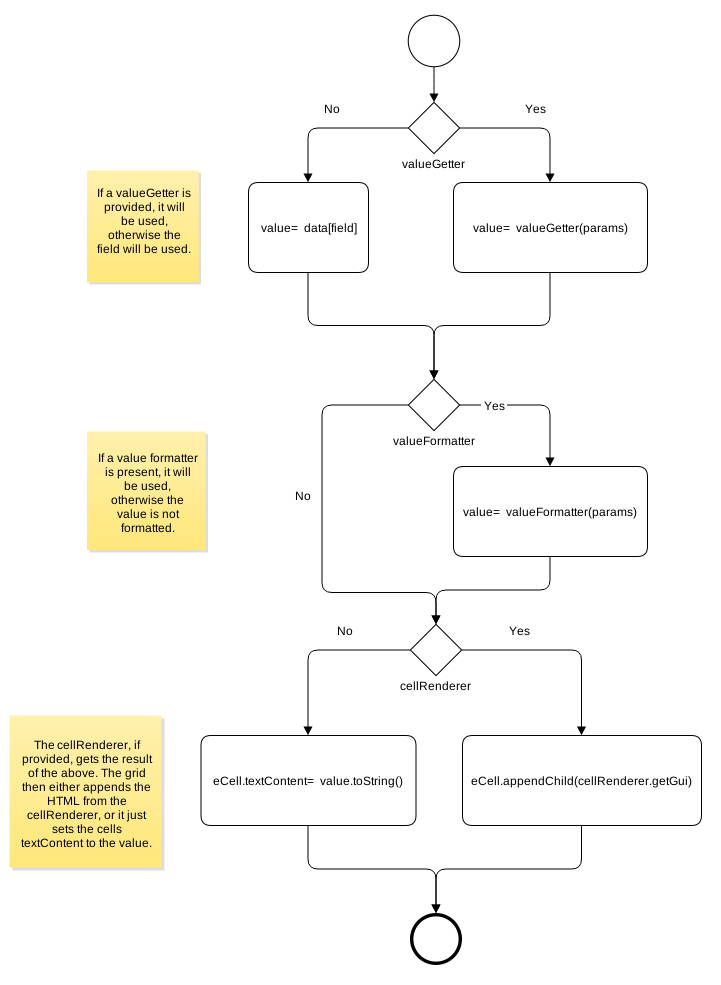
Cell Rendering Flow
The diagram below (which is taken from the section Value Getters & Formatters)
summarises the steps the grid takes while working out what to render and how to render.
In short, a value is prepared. The value comes using either the colDef.field or the
colDef.valueGetter. The value is also optionally passed through a colDef.valueFormatter
if it exists. Then the value is finally placed into the DOM, either directly, or by using the chosen
colDef.cellRenderer.
Complementing Cell Renderer Params
On top of the parameters provided by the grid, you can also provide your own parameters. This is useful if
you want to 'configure' your cell renderer. For example, you might have a cell renderer for formatting
currency but you need to provide what currency for your cell renderer to use.
Provide params to a cell renderer using the colDef option cellRendererParams.
// define cellRenderer to be reused
var myCellRenderer = function(params) {
return '<span style="color: '+params.color+'">' + params.value + '</span>';
}
// use with a color
colDef.cellRenderer = myCellRenderer;
colDef.cellRendererParams = {
color: 'guinnessBlack'
}
// use with another color
colDef.cellRenderer = myCellRenderer;
colDef.cellRendererParams = {
color: 'irishGreen'
}
Cell Renderers and Row Groups
If you are mixing cell renderers and row grouping, then you need to understand that the value and / or data
may be missing in the group row. You can check if you are on a group row of not by checking
rowNode.group.
Groups will have aggData and groupData instead of data.
This is simply fixed by checking for the existence of the data before you use it like the following:
colDef.cellRenderer = function(params) {
// check the data exists, to avoid error
if (!params.node.group) {
// data exists, so we can access it
return '<b>'+params.data.theBoldValue+'</b>';
} else {
// when we return null, the grid will display a blank cell
return null;
}
};
Cell Renderer Function
Instead of using a component, it's possible to use a simple function for a cell renderer.
The function takes the same parameters as the cell renderer init method in the
component variant. The function should return back either a) a string of HTML or b) a DOM object.
Use the function variant of a cell renderer if you have no refresh or cleanup requirements (ie
you don't need to implement the refresh or destroy functions).
If using a framework such as React or Angular for your cell renderers then you must provide a
cell renderer component. There is no function equivalent for the frameworks such as React and Angular.
Below are some simple examples of cell renderers provided as simple functions:
// put the value in bold
colDef.cellRenderer = function(params) {
return '<b>' + params.value.toUpperCase() + '</b>';
}
// put a tooltip on the value
colDef.cellRenderer = function(params) {
return '<span title="the tooltip">'+params.value+'</span>';
}
// create a DOM object
colDef.cellRenderer = function(params) {
var eDiv = document.createElement('div');
eDiv.innerHTML = '<span class="my-css-class"><button class="btn-simple">Push Me</button></span>';
var eButton = eDiv.querySelectorAll('.btn-simple')[0];
eButton.addEventListener('click', function() {
console.log('button was clicked!!');
});
return eDiv;
}
You might be wondering how the grid knows if you have provided a cell renderer component class or
a simple function, as JavaScript uses functions to implement classes. The answer is the grid looks
for the getGui() method in the prototype of the function (the only mandatory method in the cell renderer
interface). If the getGui() method exists, it assumes a component, otherwise it assumes a function.
Complex Cell Renderer Example
The example below shows five columns formatted, demonstrating each of the
methods above.
- 'Month' column uses
cellStyle to format each cell in the column with the same style.
- 'Max Temp' and 'Min Temp' columns uses the Function method to format each cell in the column with the same
style.
- 'Days of Air Frost' column uses the Component method to format each cell in the column with the same style
- 'Days Sunshine' and 'Rainfall (10mm)' use simple functions to display icons.
Accessing Cell Renderer Instances
After the grid has created an instance of a cell renderer for a cell it is possible to access that instance.
This is useful if you want to call a method that you provide on the cell renderer that has nothing to do
with the operation of the grid. Accessing cell renderers is done using the grid API
getCellRendererInstances(params).
// function takes params to identify what cells and returns back a list of cell renderers
function getCellRendererInstances(params: GetCellRendererInstancesParams): ICellRendererComp[];
// params object for the above
interface GetCellRendererInstancesParams {
// an optional list of row nodes
rowNodes?: RowNode[];
// an optional list of columns
columns?: (string|Column)[];
}
An example of getting the cell renderer for exactly one cell is as follows:
// example - get cell renderer for first row and column 'gold'
var firstRowNode = gridOptions.api.getDisplayedRowAtIndex(0);
var params = { columns: ['gold'], rowNodes: [firstRowNode]};
var instances = gridOptions.api.getCellRendererInstances(params);
if (instances.length > 0) {
// got it, user must be scrolled so that it exists
var instance = instances[0];
}
Not that this method will only return instances of the cell renderer that exists. Due to row
and column virtualisation, renderers will only exists for the user can actually see due to horizontal
and vertical scrolling.
The example below demonstrates custom methods on cell renderers called by the application. The following
can be noted:
-
The medal columns are all using the user defined
MedalCellRenderer.
The cell renderer has an arbitrary method medalUserFunction() which
prints some data to the console.
-
The Gold method executes a method on all instances of the cell renderer in the
gold column.
-
The First Row Gold method executes a method on the gold cell of the first row only.
Note that the
getCellRendererInstances() method will return nothing if the
grid is scrolled past the first row.
-
The All Cells method executes a method on all instances of all cell renderers.
If your are using a framework component (detailed below), then the returned object
is a wrapper and you can get the underlying cell renderer using getFrameworkComponentInstance()
// example - get cell renderer for first row and column 'gold'
var firstRowNode = gridOptions.api.getDisplayedRowAtIndex(0);
var params = { columns: ['gold'], rowNodes: [firstRowNode]};
var instances = gridOptions.api.getCellRendererInstances(params);
if (instances.length > 0) {
// got it, user must be scrolled so that it exists
var wrapperInstance = instances[0];
var frameworkInstance = wrapperInstance.getFrameworkComponentInstance();
}
Angular Cell Render Components
It is possible to provide Angular cell renderers for ag-Grid to use if you are are using the
Angular version of ag-Grid. See
registering framework components for how to register framework components.
Note: Here we are referring to Angular versions 2 and up. This section is not relevant to AngularJS 1.
Example: Rendering using Angular Components
Angular Methods / Lifecycle
Your Angular components need to implement AgRendererComponent.
The ag Framework expects to find the agInit method on the created component, and uses it to supply the
cell params.
All of the methods in the ICellRenderer interface described above are applicable
to the Angular Component with the following exceptions:
init() is not used. Instead implement the agInit method (on the
AgRendererComponent interface).
destroy() is not used. Instead implement the AngularOnDestroy interface
(ngOnDestroy) for
any cleanup you need to do.
getGui() is not used. Instead do normal Angular magic in your Component via the Angular template.
Handling Refresh
To handle refresh, implement logic inside the refresh() method inside your component and return true.
If you do not want to handle refresh, just return false from the refresh method (which will tell the grid you do
not handle refresh and your component will be destroyed and recreated if the underlying data changes).
Example: Rendering using more complex Angular Components
Using more complex Angular Components in the Cell Renderers - specifically how you can use nested NgModule's
within the grid.
React Cell Rendering
It is possible to provide React cell renderers for ag-Grid to use if you are are using the
React version of ag-Grid. See
registering framework components for how to register framework components.
Example: Rendering using React Components
Using React Components in the Cell Renderers
React Props
The React component will get the 'Cell Renderer Params' as described above as its React Props.
Therefore you can access all the parameters as React Props.
// React Cell Renderer Component
class NameCellRenderer extends React.Component {
// did you know that React passes props to your component constructor??
constructor(props) {
super(props);
// from here you can access any of the props!
console.log('The value is ' + props.value);
// we can even call grid API functions, if that was useful
props.api.selectAll();
}
render() {
// or access props using 'this'
return <span>{this.props.value}</span>;
}
}
React Methods / Lifecycle
All of the methods in the ICellRenderer interface described above are applicable
to the React Component with the following exceptions:
init() is not used. Instead use the React props passed to your Component.destroy() is not used. Instead use the React componentWillUnmount() method for
any cleanup you need to do.getGui() is not used. Instead do normal React magic in your render() method..
Handling Refresh
To handle refresh, implement logic inside the refresh() method inside your component and return true.
If you do not want to handle refresh, just return false from the refresh method (which will tell the grid you do
not handle refresh and your component will be destroyed and recreated if the underlying data changes).
VueJS Cell Rendering
It is possible to provide VueJS cell renderers for ag-Grid to use if you are are using the
VueJS version of ag-Grid. See
registering framework components for how to register framework components.
Example: Rendering using VueJS Components
Using VueJS Components in the Cell Renderers
VueJS Methods / Lifecycle
All of the methods in the ICellRenderer interface described above are applicable
to the VueJS Component with the following exceptions:
init() is not used. The cells value is made available implicitly via a data field called params.getGui() is not used. Instead do normal VueJS magic in your Component via the VueJS template.
Refresh
There are two ways in which cell renderers can be refreshed:
- Implement the
refresh method
- Use the
autoParamsRefresh mechanism
- Do neither of the above - in which case the grid will destroy and recreate the cell each time the cell value changes
Implement the refresh method
Within the methods section of your component you can implement the refresh() method which returns a boolean value.
If you want to manage the refresh yourself return true and if you want to let the grid manage the refresh return false (the default behaviour).
Returning false indicates that you do not wish to manage the refresh - in this case your component will be destroyed and recreated if the underlying data changes).
Enable autoParamsRefresh on your renderer
You can set the autoParamsRefresh property on the ag-grid-vue component. If you do this then the grid will automatically refresh the component, updating the supplied
params of the component.
This has the same effect as if you implemented the refresh method as follows:
methods: {
refresh(params) {
this.params = params;
return true;
}
Setting this on your renderer to refresh automatically without the cost of the component being destroyed and re-created, but without the
need of implementing refresh yourself.
Note that if you enable autoParamsRefresh then this.params will be updated and your version of refresh
will then be invoked.
The full ag-grid-vue-example repo shows a rich example of configuring
ag-Grid with Vue components, but each section for renderers, filters, editors etc will also demonstrate how this functionality can be extended with
Vue.
Polymer Cell Rendering
It is possible to provide Polymer cell renderers for ag-Grid to use if you are are using the
Polymer version of ag-Grid. See
registering framework components for how to register framework components.
Example: Rendering using Polymer Components
Using Polymer Components in the Cell Renderers
Polymer Methods / Lifecycle
All of the methods in the ICellRenderer interface described above are applicable
to the Polymer Component with the following exceptions:
init() is not used. Instead implement the agInit method. getGui() is not used. Instead do normal Polymer magic in your Component via the Polymer template.
Handling Refresh
To handle refresh, implement logic inside the refresh() method inside your component and return true.
If you do not want to handle refresh, just return false from the refresh method (which will tell the grid you do
not handle refresh and your component will be destroyed and recreated if the underlying data changes).
The full ag-grid-polymer-example repo shows many
more examples for rendering, including grouped rows, full width renderers
and so on, as well as examples on using Polymer Components with both Cell Editors and Filters
Aurelia Cell Rendering
It is possible to provide Aurelia cell renderers for ag-Grid to use if you are are using the
Aurelia version of ag-Grid.
For examples on Aurelia cellRendering, see the
ag-grid-aurelia-example on Github.
Specifying a Aurelia Cell Renderer
If you are using the ag-grid-aurelia component to create the ag-Grid instance,
then you will have the option of additionally specifying the cell renderers
as aurelia components. You have two options that are described below:
- Templates
- Cell Renderer Functions or Cell Renderer Components
We only mention Templates here - using functions or regular components is discussed above in earlier sections.
Cell Renderers from Templates
// create your cellRenderer as an Aurelia template
<ag-grid-aurelia #agGrid style="width: 100%; height: 100%;" class="ag-theme-balham"
grid-options.bind="gridOptions">
<ag-grid-column header-name="Mood" field="mood" width.bind="150" editable.bind="true">
<ag-cell-template>
<img width="20px" if.bind="params.value === 'Happy'" src="images/smiley.png"/>
<img width="20px" if.bind="params.value !== 'Happy'" src="images/smiley-sad.png"/>
</ag-cell-template>
</ag-grid-column>
</ag-grid-aurelia>
The advantage of using Templates for your renderers is that you have the ability to use Aurelia's dynamic data binding facilties.
The full ag-grid-aurelia-example repo shows many more examples for rendering, including grouped rows, full width renderers and filters.