
React Data GridRendering
The remainder of this page takes a deeper look at the grid's React rendering, including React Render Cycles and also React Developer Tools.
Show Me
The grid renders cells using React, and all parent components of the cells are also written in React, all the way back to the client application. This means all the UI from your application down to the cells, including any provided React Cell Renderers, is all 100% React.
The example below demonstrates AG Grid rendered 100% in React. Note the example has the Age column customised using a React Component.
See Cell Renderers for full details on creating Cell Renderers.
React Profile
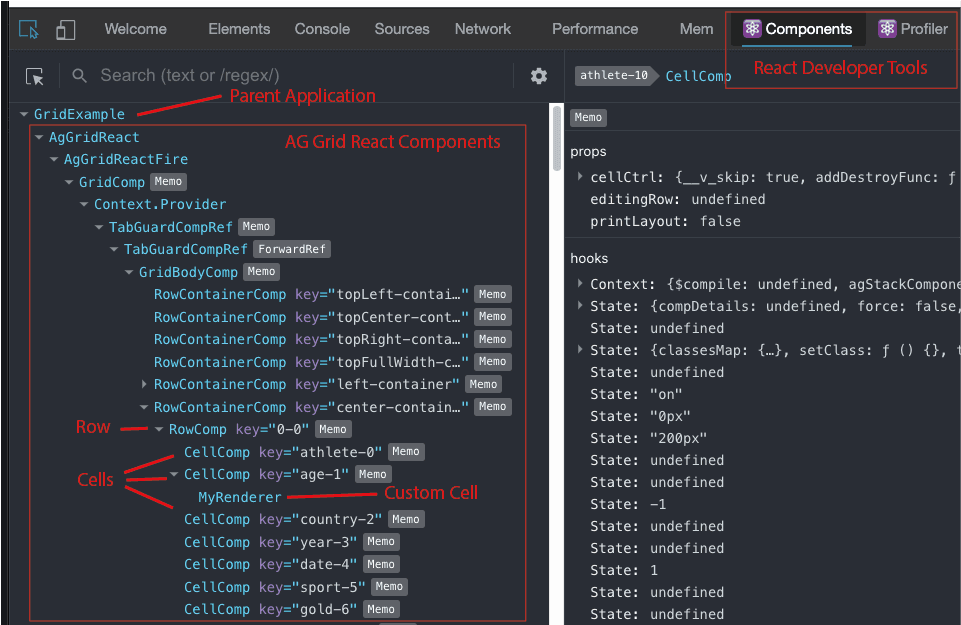
You can profile the example above using the React Developer Tools and see the internals of AG Grid written in React.
If you want to profile (using React Developer Tools) the example above, do the following:
- Open the example in Plunker.
- From inside Plunker, open in a new tab.
- Open React Developer Tools
We do not advise using the React Developer Tools on the AG Grid website, or inside Plunker, as both the AG Grid website and Plunker are also written in React, which complicates the React Developer Tools.
As the grid is written in React, we welcome trashing it using React profiling tools for how well it plays alongside your application with regards component refresh and wasted render cycles.
Using Cell Editors
Below is an example showing different types of React Cell Editors. Note the following:
- Edit any cell by double clicking the mouse.
- Country and Athlete Columns have default editors (not customised).
- Gold Column is using a React Inline Cell Renderer. The editing happens inside the cells.
- Silver Column is using a React Popup Cell Renderer (
cellEditorPopup=true). The editing happens in a popup.
See Cell Editors for full details on creating Cell Editors.
Customising Headers
Below is an example showing a grid configured with a custom React Column Header component.
- Columns Athlete and Age use a Header Comp that displays the Header name and allows sorting (by clicking on the header).
- All other columns do not have their Headers customised and work as normal.
See Header Components for full details on creating Header Components.
No Wasted Renders
AG Grid does not cause unnecessary render cycles. The following example demonstrates this.
Below each Column is configured to use a Cell Renderer that prints into the Cell the number of times the Cell has had it's render method called. This tells us how many times the render method is called. For non wasted renders, the render method should only get called if it's contents change. Note that the number stays at '1' even if you do any of the following:
- Move columns by dragging the headers. The Cell Renderer does not re-render despite the cell moving.
- Create a Cell Range by dragging the mouse over some cells. The Cell Renderers do not re-render despite the cell UI background and border changing.
Clicking 'Increase Medals' will re-render the Cell Renderer's as the displayed value is updated.
Note that we memoise the Cell Renderer using const RenderCounterCellRenderer = memo( (params) => {.
Advanced Grid Features
The rendering of AG Grid is 100% React regardless of what grid features are used.
Below is an example with Range Selection, Checkbox Click Selection and Row Grouping.
Below is an example using Master Detail. When the master grid is AG Grid React, then the detail grids also use AG Grid React. In the example both Master and Detail grids are using React Cell Renderers.
All Customisations Supported
Above we saw customising the grid Cells (Renderers and Editors) and Headers using React Components. All of the other customisations allowed by AG Grid are also supported.
The example below shows the following customisations:
- Column Filters and Floating Filters.
- Tool Panels.
- Status Bar.
- Overlays.
- Tooltip.