---
product: "AG Grid"
title: "Set Filter - Overview"
description: "Set Filter works like Excel, providing checkboxes to select values from a set."
enterprise: true
framework: angular
version: "36.2.0"
related:
- title: "Text Filter"
url: "https://www.ag-grid.com/archive/36.2.0/angular-data-grid/filter-text/"
- title: "Number Filter"
url: "https://www.ag-grid.com/archive/36.2.0/angular-data-grid/filter-number/"
- title: "BigInt Filter"
url: "https://www.ag-grid.com/archive/36.2.0/angular-data-grid/filter-bigint/"
- title: "Date Filter"
url: "https://www.ag-grid.com/archive/36.2.0/angular-data-grid/filter-date/"
- title: "Multi Filter"
url: "https://www.ag-grid.com/archive/36.2.0/angular-data-grid/filter-multi/"
- title: "Filter Conditions"
url: "https://www.ag-grid.com/archive/36.2.0/angular-data-grid/filter-conditions/"
- title: "Applying Filters"
url: "https://www.ag-grid.com/archive/36.2.0/angular-data-grid/filter-applying/"
- title: "Filter API"
url: "https://www.ag-grid.com/archive/36.2.0/angular-data-grid/filter-api/"
llms: "https://www.ag-grid.com/archive/36.2.0/llms.txt"
---
# Set Filter - Overview
The Set Filter takes inspiration from Excel's AutoFilter and allows filtering on sets of data.
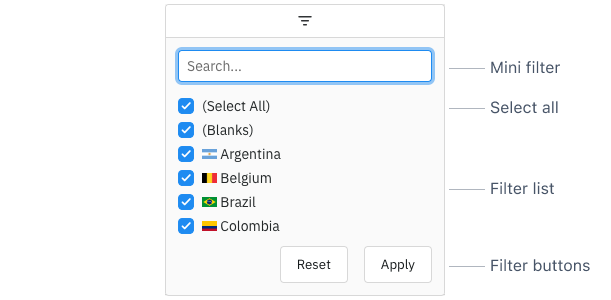
## Set Filter Sections
The Set Filter is comprised of the following sections:
- **[Mini Filter](https://www.ag-grid.com/archive/36.2.0/angular-data-grid/filter-set-mini-filter/)**: used to narrow the values available for selection inside the Filter List.
- **Select All**: used to select / deselect all values shown in the Filter List.
- **[Filter List](https://www.ag-grid.com/archive/36.2.0/angular-data-grid/filter-set-filter-list/)**: a list of Set Filter Values which can be selected / deselected to set the filter.
- **[Filter Buttons](https://www.ag-grid.com/archive/36.2.0/angular-data-grid/filter-applying/#apply-clear-reset-and-cancel-buttons)**: Action buttons that can be optionally added to the bottom of the Set Filter.
## Enabling Set Filters
The Set Filter is the default filter used in AG Grid Enterprise (unless it has been [Suppressed by Default](https://www.ag-grid.com/archive/36.2.0/angular-data-grid/filter-set/#suppress-set-filter-by-default) or the `SetFilterModule` has not been registered), but it can also be explicitly configured as shown below:
```ts
this.columnDefs = [
// Set Filter is used by default in Enterprise version
{ field: 'athlete', filter: true },
// explicitly configure column to use the Set Filter
{ field: 'country', filter: 'agSetColumnFilter' },
];
```
The following example demonstrates how the Set Filter can be enabled. Note the following:
- The **Athlete** column has `filter=true` which defaults to the Set Filter as this example is using AG Grid Enterprise.
- The **Country** column is explicitly configured to use the Set Filter using `filter='agSetColumnFilter'`.
- All other columns are configured to use the [Number Filter](https://www.ag-grid.com/archive/36.2.0/angular-data-grid/filter-number/) using `filter='agNumberColumnFilter'`.
- Filters can be accessed by clicking on the filter icon in the [Floating Filters](https://www.ag-grid.com/archive/36.2.0/angular-data-grid/floating-filters/).
#### Enabling Set Filters
```ts
import { Component } from "@angular/core";
import { HttpClient } from "@angular/common/http";
import { AgGridAngular } from "ag-grid-angular";
import {
ClientSideRowModelModule,
ColDef,
ColGroupDef,
GridApi,
GridOptions,
GridReadyEvent,
ModuleRegistry,
NumberFilterModule,
enableDevValidations,
} from "ag-grid-community";
import {
ColumnMenuModule,
ColumnsToolPanelModule,
ContextMenuModule,
SetFilterModule,
} from "ag-grid-enterprise";
if (process.env.NODE_ENV !== "production") {
// Enable extended validations only for development
enableDevValidations();
}
ModuleRegistry.registerModules([
ClientSideRowModelModule,
ColumnsToolPanelModule,
ColumnMenuModule,
ContextMenuModule,
SetFilterModule,
NumberFilterModule,
]);
import { IOlympicData } from "./interfaces";
@Component({
selector: "my-app",
standalone: true,
imports: [AgGridAngular],
template: ` `,
})
export class AppComponent {
columnDefs: ColDef[] = [
// set filters
{ field: "athlete", filter: true },
{ field: "country", filter: "agSetColumnFilter" },
// number filters
{ field: "gold", filter: "agNumberColumnFilter" },
{ field: "silver", filter: "agNumberColumnFilter" },
{ field: "bronze", filter: "agNumberColumnFilter" },
];
defaultColDef: ColDef = {
flex: 1,
minWidth: 200,
floatingFilter: true,
};
rowData!: IOlympicData[];
constructor(private http: HttpClient) {}
onGridReady(params: GridReadyEvent) {
this.http
.get<
IOlympicData[]
>("https://www.ag-grid.com/example-assets/olympic-winners.json")
.subscribe((data) => (this.rowData = data));
}
}
```
[Live example: Enabling Set Filters](https://www.ag-grid.com/archive/36.2.0/examples/filter-set/enabling-set-filters/angular/)
## Set Filters in the Advanced Filter
Where the [Advanced Filter](https://www.ag-grid.com/archive/36.2.0/angular-data-grid/filter-advanced-columns/#set-filters) is enabled, a column that enables a Set Filter also offers `is any of` and `is none of` there, reusing the column's own Set Filter configuration and matching the same rows a selection in the Filter List would.
`filterParams.filterOptions` decides for any column: a list naming `isAnyOf` or `isNoneOf` offers them on a column with a different filter, and a list leaving them out withholds them here. See [Enabling and Disabling the Set Options](https://www.ag-grid.com/archive/36.2.0/angular-data-grid/filter-advanced-columns/#enabling-and-disabling-the-set-options).
## Suppress Set Filter by Default
When `filter = true`, the Set Filter is used for AG Grid Enterprise by default. To use the [Text Filter](https://www.ag-grid.com/archive/36.2.0/angular-data-grid/filter-text/), [Number Filter](https://www.ag-grid.com/archive/36.2.0/angular-data-grid/filter-number/) or [Date Filter](https://www.ag-grid.com/archive/36.2.0/angular-data-grid/filter-date/) instead based on the [Cell Data Type](https://www.ag-grid.com/archive/36.2.0/angular-data-grid/cell-data-types/) (as in AG Grid Community), set the grid option `suppressSetFilterByDefault = true`.
Since the column is then no longer a Set Filter, it also stops offering `is any of` and `is none of` in the [Advanced Filter](https://www.ag-grid.com/archive/36.2.0/angular-data-grid/filter-advanced-columns/#set-filters) unless its [`filterOptions`](https://www.ag-grid.com/archive/36.2.0/angular-data-grid/filter-advanced-columns/#enabling-and-disabling-the-set-options) name them.
## Set Filter Parameters
Set Filters are configured though the `filterParams` attribute of the column definition (`ISetFilterParams` interface):
| Property | Type | Required | Default | Description |
| --- | --- | --- | --- | --- |
| `applyMiniFilterWhileTyping` | `boolean` | | | |
| `browserAutoComplete` | `boolean \| string` | | | |
| `buttons` | `FilterAction[]` | | | |
| `caseSensitive` | `boolean` | | | |
| `cellHeight` | `number` | | | |
| `cellRenderer` | `any` | | | |
| `closeOnApply` | `boolean` | | | |
| `comparator` | `Function` | | | |
| `debounceMs` | `number` | | | |
| `defaultToNothingSelected` | `boolean` | | | |
| `excelMode` | `'mac' \| 'windows'` | | | |
| `keyCreator` | `Function` | | | |
| `readOnly` | `boolean` | | | |
| `refreshValuesOnOpen` | `boolean` | | | |
| `showTooltips` | `boolean` | | | |
| `suppressClearModelOnRefreshValues` | `boolean` | | | |
| `suppressMiniFilter` | `boolean` | | | |
| `suppressSelectAll` | `boolean` | | | |
| `suppressSorting` | `boolean` | | | |
| `textFormatter` | `Function` | | | |
| `treeList` | `boolean` | | | |
| `treeListFormatter` | `Function` | | | |
| `treeListPathGetter` | `Function` | | | |
| `valueFormatter` | `Function` | | | |
| `values` | `SetFilterValues` | | | |
### Updating Set Filter Parameters
When new column definitions are set with updated Set Filter parameters, the Set Filter will update to reflect these. For certain filter parameters, changing the parameter will invalidate the filter model. This will cause the filter to be reset.
The following filter parameters will reset the Set Filter - `treeList`, `treeListPathGetter`, `caseSensitive`, `comparator`, and `excelMode`.
Additionally, a few column definition properties will also reset the Set Filter - `filterValueGetter`, `keyCreator` (unless specified in both the old and new filter parameters), and `valueFormatter` (if no `keyCreator` and the [Cell Data Type](https://www.ag-grid.com/archive/36.2.0/angular-data-grid/cell-data-types/#pre-defined-cell-data-types) is not `'number'` or `'text'`).
For the parameters above which are functions, define them as constants outside of the column definition to avoid resetting the Set Filter when passing new column definitions.