---
product: "AG Grid"
title: "Cell Text Selection"
description: "The grid can be configured to allow simple text selection."
framework: angular
version: "36.2.0"
related:
- title: "Cell Content"
url: "https://www.ag-grid.com/archive/36.2.0/angular-data-grid/cell-content/"
- title: "Find"
url: "https://www.ag-grid.com/archive/36.2.0/angular-data-grid/find/"
- title: "Notes"
url: "https://www.ag-grid.com/archive/36.2.0/angular-data-grid/notes/"
- title: "Styling Cells"
url: "https://www.ag-grid.com/archive/36.2.0/angular-data-grid/cell-styles/"
- title: "Highlighting Changes"
url: "https://www.ag-grid.com/archive/36.2.0/angular-data-grid/change-cell-renderers/"
- title: "Tooltips"
url: "https://www.ag-grid.com/archive/36.2.0/angular-data-grid/tooltips/"
- title: "Expressions"
url: "https://www.ag-grid.com/archive/36.2.0/angular-data-grid/cell-expressions/"
- title: "View Refresh"
url: "https://www.ag-grid.com/archive/36.2.0/angular-data-grid/view-refresh/"
- title: "Reference Data"
url: "https://www.ag-grid.com/archive/36.2.0/angular-data-grid/reference-data/"
llms: "https://www.ag-grid.com/archive/36.2.0/llms.txt"
---
# Cell Text Selection
The grid can be configured to allow simple text selection.
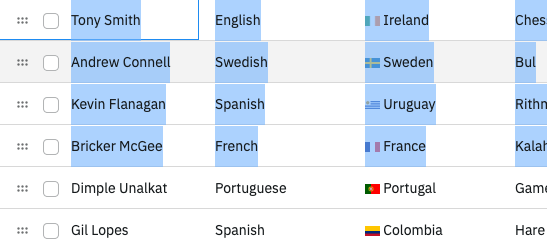
## Enabling Cell Text Selection
To enable text selection as if the grid were a regular table, set the grid option `enableCellTextSelection = true`. For the selection to work correctly, the order of the rows within the DOM must match what is displayed by setting the grid option `ensureDomOrder = true`.
#### Cell Text Selection
```ts
import { Component } from "@angular/core";
import { HttpClient } from "@angular/common/http";
import { AgGridAngular } from "ag-grid-angular";
import {
ClientSideRowModelModule,
ColDef,
ColGroupDef,
GridApi,
GridOptions,
GridReadyEvent,
ModuleRegistry,
enableDevValidations,
} from "ag-grid-community";
if (process.env.NODE_ENV !== "production") {
// Enable extended validations only for development
enableDevValidations();
}
ModuleRegistry.registerModules([ClientSideRowModelModule]);
import { IOlympicData } from "./interfaces";
@Component({
selector: "my-app",
standalone: true,
imports: [AgGridAngular],
template: ` `,
})
export class AppComponent {
columnDefs: ColDef[] = [
{ field: "athlete" },
{ field: "sport" },
{ field: "age" },
];
rowData!: IOlympicData[];
constructor(private http: HttpClient) {}
onGridReady(params: GridReadyEvent) {
this.http
.get<
IOlympicData[]
>("https://www.ag-grid.com/example-assets/olympic-winners.json")
.subscribe((data) => (this.rowData = data));
}
}
```
[Live example: Cell Text Selection](https://www.ag-grid.com/archive/36.2.0/examples/cell-text-selection/cell-text-selection/angular/)
When `enableCellTextSelection` is set to `true`, the default [Clipboard](https://www.ag-grid.com/archive/36.2.0/angular-data-grid/clipboard/) behaviour is disabled, and only the selected text is copied.